
Can you Chromecast Apple TV? It's a common question for people who love streaming shows from the Apple TV app but own a Chromecast or a Chromecast-enabled smart TV. The question makes sense—after all, the Apple TV app and Chromecast don't play natively together. While you can't cast directly from the Apple TV app to Chromecast, there are a few simple workarounds that make it possible to enjoy Apple TV on your Chromecast device without much hassle.
Can You Chromecast from Apple TV
The short answer is no, not directly. The Apple TV app is designed to work with AirPlay, Apple's proprietary streaming technology, while Chromecast relies on Google Cast. Since these two systems aren't compatible, there is no built-in way to stream Apple TV content from an iPhone or MacBook directly to a Chromecast.
AirPlay vs. Chromecast: why they don't work together:
| Feature | AirPlay (Apple) | Google Cast (Chromecast) |
|---|---|---|
| Developer | Apple Inc. | Google LLC |
| Main Use | Streaming and mirroring from iPhone, iPad, or Mac to Apple devices (Apple TV, HomePod, AirPlay-enabled TVs) | Streaming and mirroring from Android, Chrome browser, or Cast-enabled apps to Chromecast and Cast-enabled TVs |
| Compatibility | Works best within the Apple ecosystem | Works best within the Google/Android ecosystem |
| Connection Method | Relies on Wi-Fi, tightly integrated with iOS/macOS | Relies on Wi-Fi, integrated with Android and Chrome |
| Supported Devices | iPhone, iPad, Mac, Apple TV, select smart TVs | Android phones/tablets, Chrome browser, Chromecast, Cast-enabled smart TVs |
| Cross-Platform Support | Limited (mostly Apple devices) | Broad (Android, iOS with supported apps, Windows via Chrome) |
| Apple TV App Support | Native | Not supported directly |
Although Apple TV+ and Chromecast use different technologies for media casting, there are several easy workarounds to bridge the gap. With these methods, you can still enjoy Apple TV shows and movies on a Chromecast or Chromecast-enabled smart TV. None of them requires advanced setup, and once you've tried them, streaming becomes just as smooth as using a native app.
Method 1. Use the PigeonCast App
One of the easiest ways to stream Apple TV to a Chromecast is by using PigeonCast, a free third-party casting app available on the App Store. With PigeonCast, you can turn your iPhone, iPad, or MacBook into a Google Cast sender or Chromecast from your iPhone, making it possible to connect directly to a Chromecast or Chromecast-enabled smart TV.
How to Chromecast Apple TV from iPhone with PigeonCast:
Step 1. Download the PigeonCast app and install it on your iPhone.

PigeonCast Screen Mirroring

Official Download


Step 2. Confirm that your Apple device and Chromecast are connected to the same Wi-Fi network.
Step 3. Launch the PigeonCast app on your Apple device and choose Chromecast or Chromecast-enabled TV from the device list.
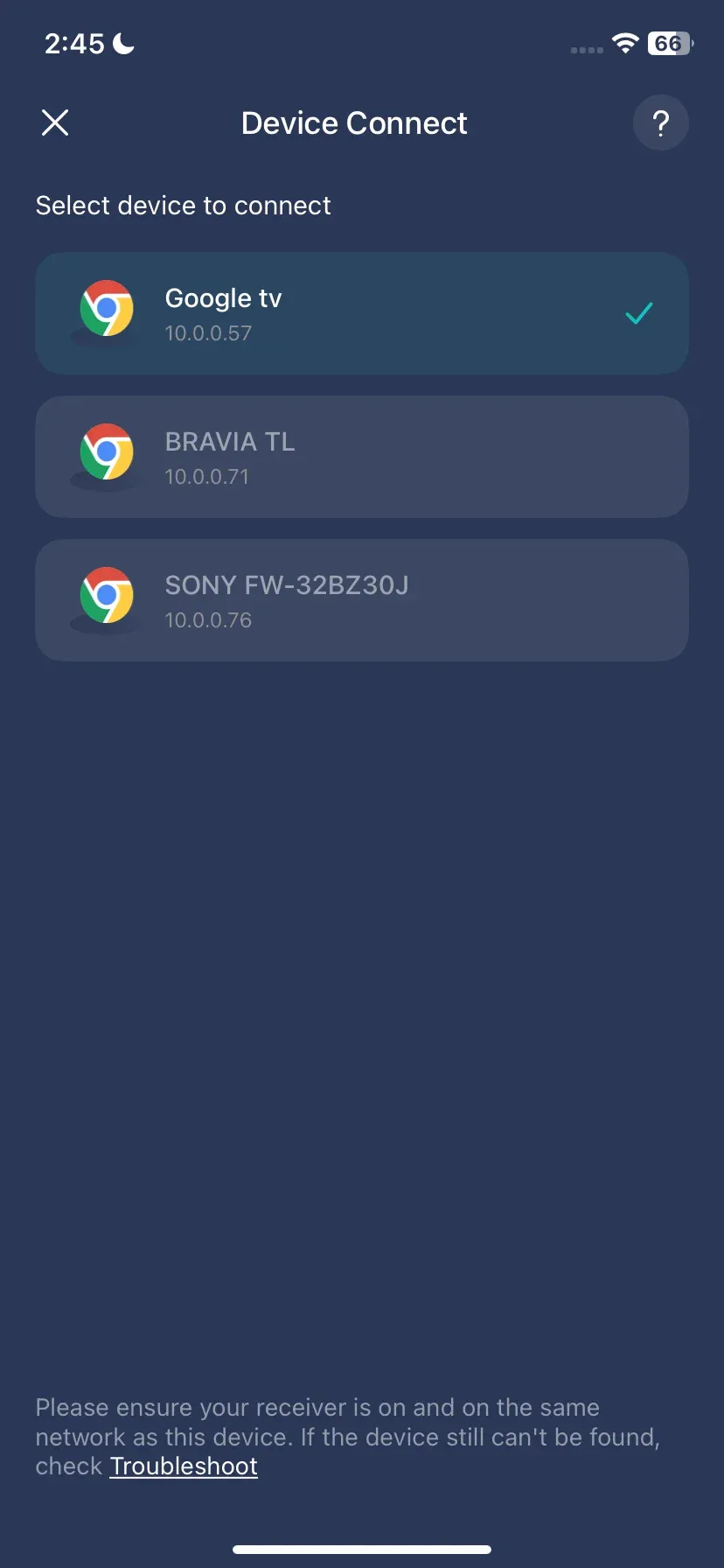
Step 4. Once connected, tap the Screen Mirroring option, which will project your iPhone's screen onto your TV.
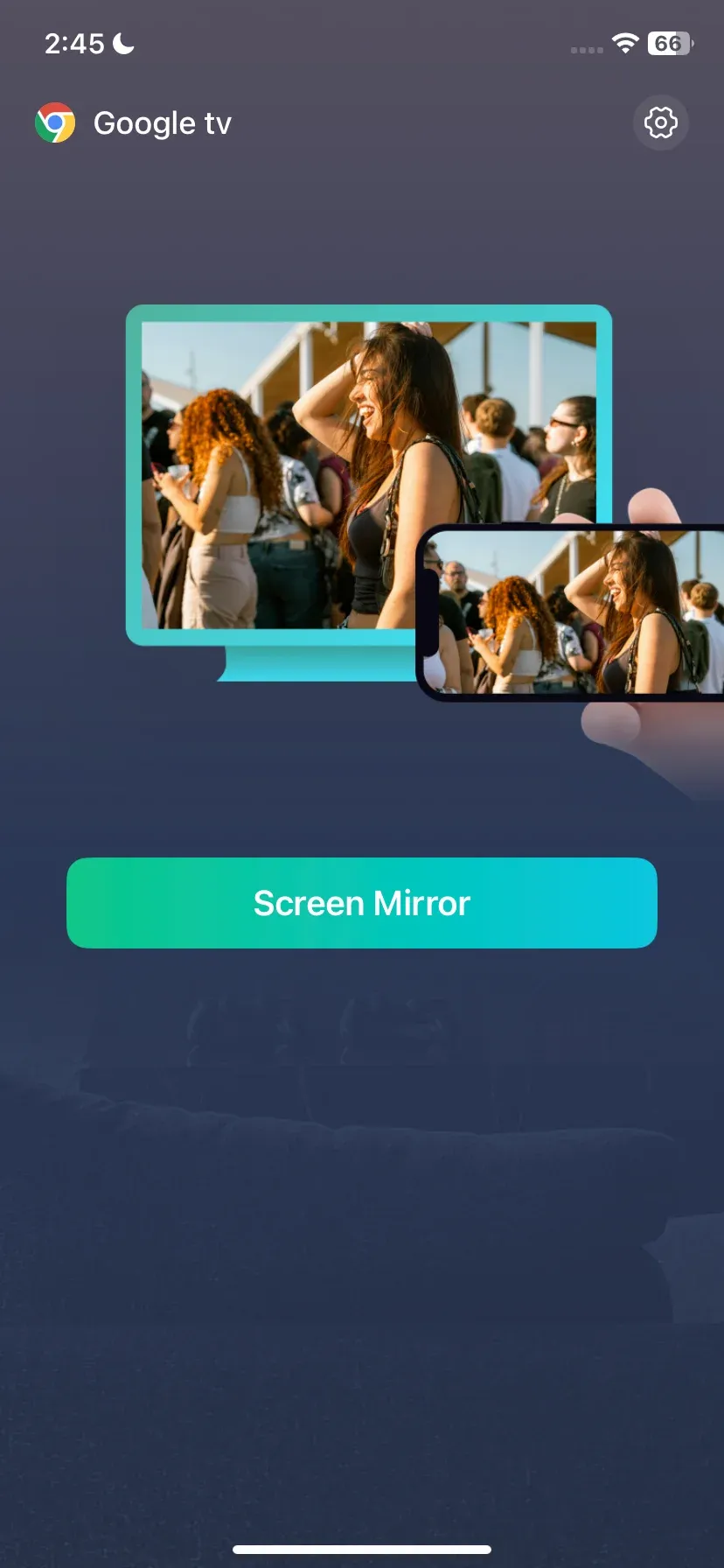
Step 5. Launch the Apple TV app on your iPhone, start playing your show or movie, and enjoy it on the TV screen.
Why choose PigeonCast:

- Free, lightweight, and user-friendly: PigeonCast is easy to install and use, making casting and screen mirroring hassle-free.
- Wide device support: Compatible with iPhone, Android, MacBook, Windows PC, Android TV, and Apple TV, so you can cast from almost any device.
- High-quality streaming: Enjoy smooth, high-definition screen mirroring and casting with minimal lag.
Whether you're watching Apple TV+, sharing presentations, or streaming video from your device, PigeonCast provides a reliable solution without complicated setup.
Method 2. Use the Chrome Browser
Can you stream Apple TV on Chromecast from a laptop? Yes, there is a dedicated desktop method for "Apple TV Chromecast". If you prefer watching Apple TV+ on a bigger screen without using additional apps, this method is an optimum solution.
This method leverages Chrome's built-in Cast feature to send content from your computer directly to Chromecast:
Step 1. On your Windows or macOS laptop, open Apple TV+ in Google Chrome.
Step 2. Make sure your Chromecast or Chromecast-enabled TV is powered on and connected to the same Wi-Fi network as your computer.
Step 3. Enable the Cast feature on your Google Chrome.
- Click the three-dot menu in the top-right corner of Chrome.
- Select Cast from the dropdown. Chrome will search for available devices.
- Choose your Chromecast device from the list.
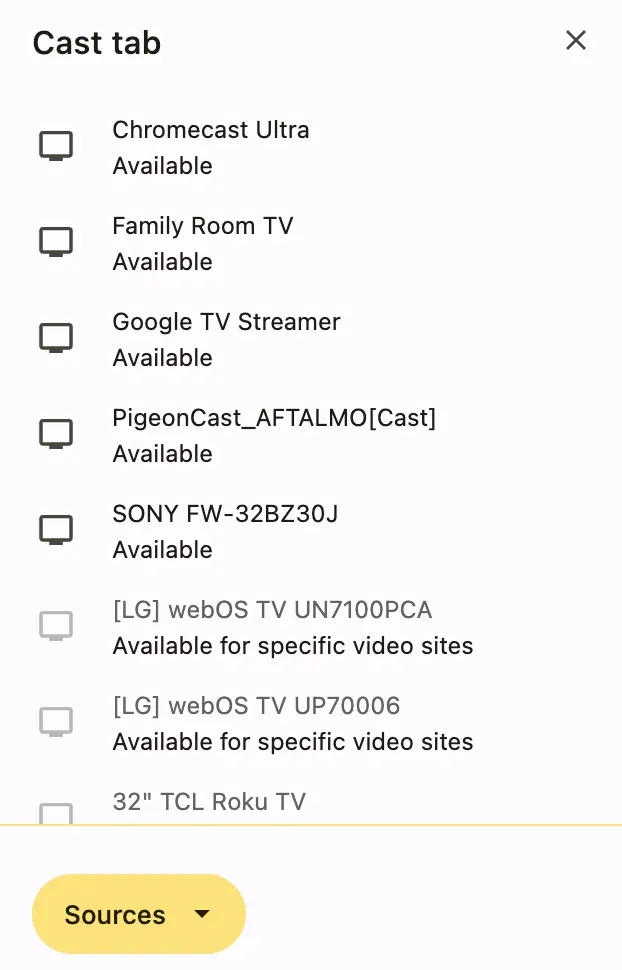
Step 4. Select Cast tab from the Source menu to Chromecast Apple TV+ tab.
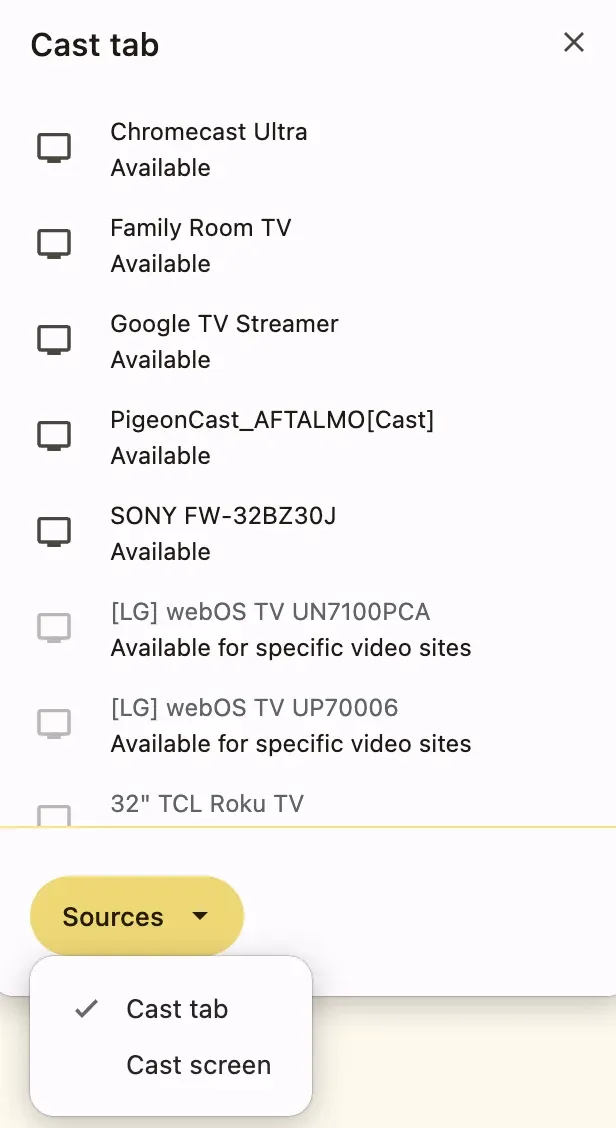
Step 5. Once connected, your Apple TV+ video will stream to your Chromecast.
Google Chrome is a good way to connect your laptop to a TV with Chromecast built in. But make sure your Chrome browser is up to date for the best casting experience.
Method 3. Use Chromecast with Google TV
Can you stream Apple TV on Chromecast? If you own a Google TV device with Chromecast, streaming Apple TV content on Chromecast becomes possible and easier. While Apple TV+ doesn't natively support Chromecast, Chromecast Google TV provides access to the Apple TV app, allowing you to watch your favorite shows and movies directly on your TV.
How to watch Apple TV on Chromecast with Google TV:
Step 1. Connect your Google TV device to your TV and ensure it's powered on.
Step 2. Connect it to the same Wi-Fi network you'll use for streaming.
Step 3. Navigate to the Google Play Store on your Google TV, search for Apple TV, and install the app.
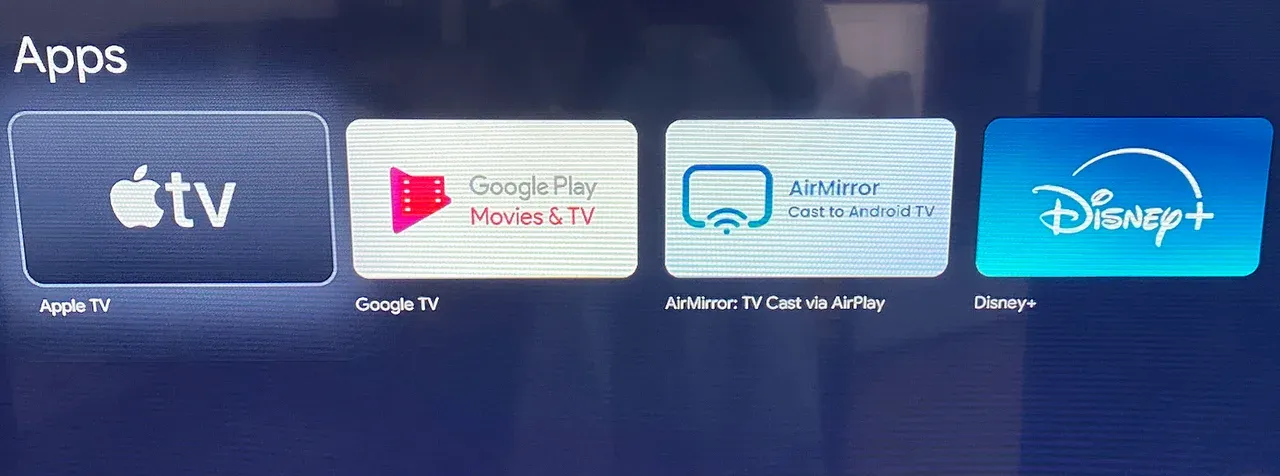
Step 4. Open the Apple TV app on your Google TV and sign in using your Apple ID.
Step 5. Browse Apple TV+ content and select a show or movie.
Unlike casting Apple TV to Chromecast from another device, this method streams directly to your TV, reducing buffering and quality loss. Importantly, you'll get full access to Apple TV features like Up Next, original shows, and purchased movies.
Conclusion
So, can you cast Apple TV to Chromecast? While there's no direct way to stream Apple TV to Chromecast due to incompatible technologies, there are several effective workarounds. Whether you use the PigeonCast app on your iPhone or MacBook, the Google Chrome browser on your desktop, or a Chromecast with Google TV, you can enjoy Apple TV+ shows and movies on a bigger screen without hassle. Each method has its benefits, so you can choose the one that fits your devices and preferences.
Can You Chromecast Apple TV FAQs
Can you Chromecast Apple TV from an iPhone?
It depends on what you're trying to cast. The Apple TV app on iPhone doesn't offer native Chromecast support in every scenario, and some content may only support AirPlay. If Chromecast isn't available, you can use screen mirroring solutions such as PigeonCast or other casting apps to display Apple TV content on a Chromecast-connected TV.
Is there an Apple TV app for Chromecast?
Yes, but only on certain devices. While standard Chromecast dongles rely on casting from another device, Chromecast with Google TV can install the Apple TV app directly from the Google Play Store. Once installed, you can sign in to your Apple account and stream Apple TV+ content without needing an iPhone, iPad, or Mac.
Why doesn't Apple TV cast to Chromecast directly?
Apple TV and Chromecast use different streaming technologies. Apple's ecosystem is built around AirPlay, while Chromecast relies on Google Cast. Because these protocols aren't fully compatible, some Apple TV content can't be sent directly to Chromecast. In those cases, screen mirroring or using the Apple TV app on Google TV may provide a workaround.
Is there a better alternative to Chromecast for Apple users?
If you primarily use Apple devices, an Apple TV streaming box or an AirPlay-compatible smart TV usually provides the most seamless experience. Features like screen mirroring, automatic device discovery, and ecosystem integration tend to work more smoothly. However, Chromecast and Google TV remain popular choices for users who want broader cross-platform compatibility.
What's the difference between Google Cast and Chromecast?
Google Cast is the technology that enables devices to send content to another screen, while Chromecast is the hardware or built-in receiver that accepts those cast requests. In other words, Google Cast is the protocol, and Chromecast is one of the products that uses it. Many modern smart TVs support Google Cast even without a separate Chromecast device.
What are the best Chromecast apps for iPhone?
Several popular iPhone apps work well with Chromecast, including YouTube, Netflix, Disney+, Spotify, YouTube Music, and Google Photos. For content that doesn't natively support Chromecast—such as certain websites, presentations, or screen mirroring scenarios—third-party casting solutions like PigeonCast can help bridge the compatibility gap.
Can you watch Apple TV+ on Chromecast?
Yes. If you're using Chromecast with Google TV, you can install the Apple TV app directly and watch Apple TV+ without casting from another device. On older Chromecast models, availability depends on the app and device you're using, so screen mirroring may sometimes be required.
Can you AirPlay to Chromecast?
No, Chromecast doesn't natively support AirPlay because they use different wireless streaming protocols. If you want to display content from an iPhone or Mac on a Chromecast-connected TV, you'll typically need a screen mirroring app, a browser-based solution, or a device that supports both AirPlay and Google Cast.
Mia Clarke is a technology editor specializing in screen mirroring and casting solutions across multiple platforms. Mia provides clear, practical guides and in-depth insights to help users seamlessly connect their devices. Passionate about enhancing digital experiences, Mia is dedicated to keeping readers updated on the latest trends and tools in cross-platform screen sharing. Whether you’re looking to mirror your smartphone, laptop, or smart TV, Mia’s content delivers reliable, user-friendly advice to simplify your tech setup.