
If you are searching for the best app for screen mirroring, the hardest part is not finding app names. It is figuring out which kind of app you actually need. Some tools are built for everyday phone-to-TV mirroring. Some are better when your computer needs to act as the receiving screen. Others work best in classrooms, meetings, or mixed-device homes.
That is why a good comparison should not treat every app as if it solves the same job. A cross-platform mirroring app, a receiver app for Mac or PC, and a basic free mobile mirroring tool may all appear in the same search results, but they are not equally practical for the same setup.
If you want one short answer, PigeonCast is the best starting point for most people because it fits more real-world device combinations than the more specialized options below. If your needs are narrower, another app on this list may be a better fit.
Quick Answer: Which Screen Mirroring App Should You Use?
If you want a fast recommendation without reading the full guide:
- Choose PigeonCast if you want a simple, free app for everyday screen mirroring across different device types
- Choose LetsView if your first priority is trying a free screen mirroring app
- Choose ApowerMirror if you want a more feature-heavy personal mirroring tool
- Choose Reflector, AirServer, Mirroring360, or LonelyScreen if your computer mainly needs to receive mirrored content


Overall Rating:



This quick filter already solves most real-world decisions.
Not Every Screen Mirroring App Solves the Same Problem
Before comparing the apps, it helps to split them into two practical categories.
Cross-Platform Everyday Mirroring Apps
These are the apps most people expect when they search for a screen mirroring app. They are meant for ordinary sending and receiving workflows across phones, computers, and TVs. PigeonCast, LetsView, and ApowerMirror fit this category best.
They make the most sense when:
- you switch between iPhone, Android, Windows, Mac, or TV devices
- you want one repeatable workflow instead of different steps for each ecosystem
- you care more about broad compatibility than presentation-specific features
Receiver-Focused Screen Mirroring Apps
Reflector, AirServer, Mirroring360, and LonelyScreen fit better here. These apps are useful when a Mac or Windows PC needs to act like the receiving screen for incoming mirrored content.
They make the most sense when:
- your laptop or desktop is the main destination
- you need a classroom, demo, or meeting-room workflow
- multiple people may connect to the same screen over time
That difference matters because the best app for screen mirroring is not always the one with the most features. It is the one that matches your actual job.
Best App for Screen Mirroring Overall: PigeonCast
PigeonCast could be the best first app to test because it is built for broad, everyday screen mirroring instead of one narrow environment.
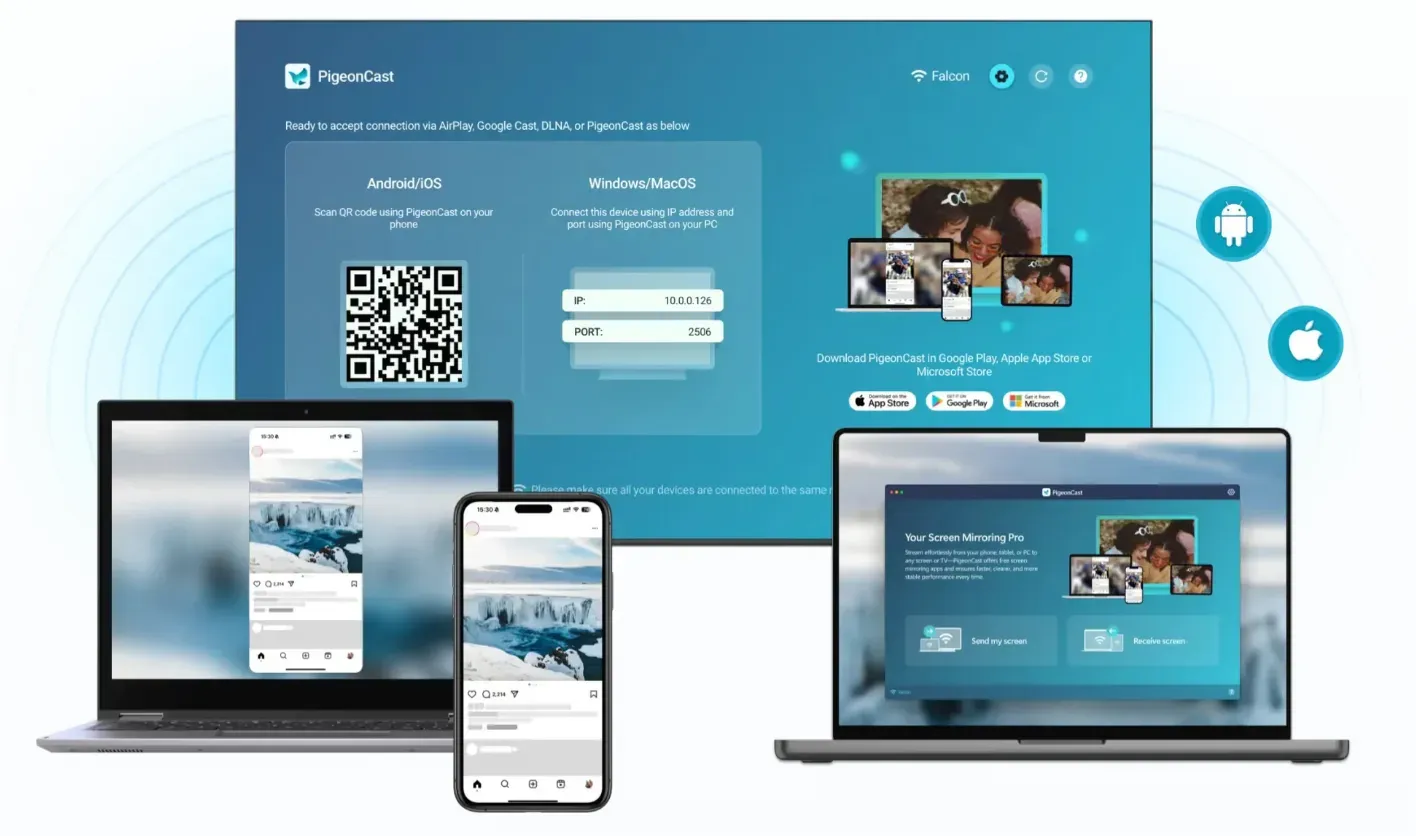
Instead of assuming you live inside one ecosystem, it is designed around mixed-device use. That makes it more practical for people who move between iPhone, Android, Mac, Windows, and TV setups instead of mirroring the same two devices forever.
Why It Works Well for Most People
The biggest real-world mirroring problem is usually compatibility, not missing advanced controls. Free PigeonCast is the strongest option on this list when your goal is to keep one familiar workflow across multiple combinations.
It is a practical fit for:
- phone-to-TV mirroring
- computer-to-TV mirroring
- phone-to-computer mirroring
- households that mix Apple and non-Apple devices
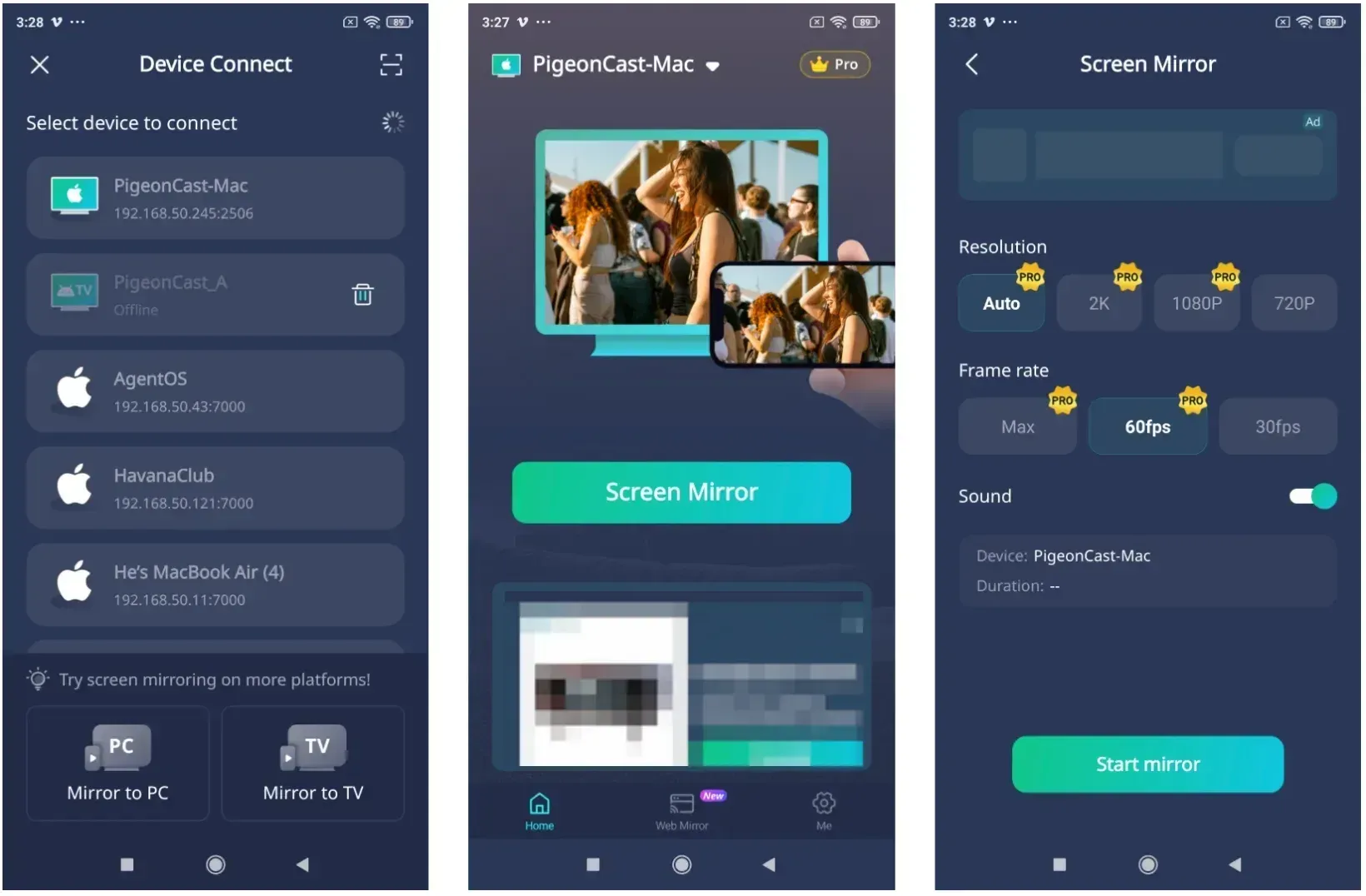
Each screen mirroring session is simple:
- Install PigeonCast on both sides that are connected to the same Wi-Fi network.
- Open the PigeonCast on both sides and choose the target device from the list.
- Choose the mirroring quality, confirm sound settings, and start mirroring.
When You Should Choose It
PigeonCast makes the most sense when:
- you need a free screen mirroring app
- your devices change often
- you want one app instead of separate platform-specific workarounds
- you need a screen mirroring app for iPhone and Android rather than just one platform
- you want a general-purpose screen mirroring workflow, not just a presentation receiver
LetsView: The Best Free Screen Mirroring App to Try First
LetsView is one of the easiest apps to test if your main goal is to start free and keep expectations simple.
Its appeal is straightforward. It supports common consumer platforms and gives people a low-friction way to try mirroring without committing to a paid setup first. That makes it a good second recommendation for casual users who want a free screen mirroring app before they worry about advanced features.
When LetsView Makes Sense
LetsView is a good fit when:
- you want a free starting point
- you only need basic home mirroring
- you are testing whether your network and devices behave well enough for wireless mirroring
The main limitation is that a free-first tool is not always the most dependable long-term choice if you need stronger workflow consistency.
ApowerMirror: A Feature-Heavy Personal Mirroring App
ApowerMirror is a better fit for users who want a fuller app experience with extra controls rather than a stripped-down starting point.
Compared with simpler options, it is usually discussed as a more feature-heavy personal mirroring tool. That can make it attractive if you care about a broader control surface inside the app itself instead of just getting your screen onto another display as quickly as possible.
When ApowerMirror Makes Sense
ApowerMirror is worth considering when:
- you want more in-app controls than a very basic mirroring tool
- you are comfortable with a more software-like interface
- you still want a consumer-facing app rather than a meeting-room receiver
For many readers, though, more features do not automatically mean a better fit. If compatibility and simplicity matter more than app depth, PigeonCast or LetsView is often easier to start with.
Reflector: Best for Presentations and Demonstrations
Reflector is one of the clearest receiver-focused options on this list. It is most useful when your computer needs to display incoming streams from other devices rather than act as the primary sending device.
That is why Reflector shows up so often in education, demos, and shared-display environments. It is less about everyday casual mirroring in the living room and more about turning a computer into a flexible destination for incoming content.
When You Should Choose Reflector
Reflector makes the most sense when:
- your Mac or PC needs to act as the receiving screen
- multiple presenters may connect over time
- presentation and demo workflows matter more than home entertainment use
AirServer: Best for Dedicated Receiver Setups
AirServer is also strongest when the destination device matters more than the sender. In practice, it is a receiver-oriented app rather than the default recommendation for everyday mixed-device mirroring.
That makes it more relevant in meeting rooms, shared workspaces, and setups where the receiving computer stays in place and other devices connect to it as needed.

When You Should Choose AirServer
AirServer is a good fit when:
- your main job is turning a computer into a reliable receiving endpoint
- you expect repeated incoming connections from different users
- you care more about the receiver role than about a consumer-style mirror-to-TV workflow
Mirroring360: Good for Shared-Screen Environments
Mirroring360 sits in a similar part of the market as the other receiver-oriented tools, but it is especially easy to understand if you think in terms of shared-screen environments.
It is not the first app most people need for casual phone mirroring at home. It is more useful when a computer becomes the center of the mirroring setup and people around it need to connect in a repeatable way.
When Mirroring360 Makes Sense
Mirroring360 makes the most sense when:
- you want a receiver-first workflow
- a classroom or team environment matters more than solo entertainment use
- your computer is the screen that others are expected to mirror to
LonelyScreen: A Simple Receiver App for Apple-Oriented Setups
LonelyScreen is another receiver-style option, but it usually makes the most sense for people who want a simpler receiving app rather than a broader all-purpose mirroring platform.
That narrower focus can be useful when you do not need a full cross-platform solution and mainly care about letting a computer receive mirrored content in a straightforward way.
When You Should Choose LonelyScreen
LonelyScreen is worth a look when:
- you mainly need a receiving app on a computer
- your mirroring workflow is relatively simple
- you are comparing lightweight receiver tools rather than full mixed-device platforms
Which Is the Best Screen Mirroring App?
| Option | Best for | Type | Main strength | Main limitation |
|---|---|---|---|---|
| PigeonCast | Mixed-device everyday use | Cross-platform app | Broad compatibility across common device types | Depends on local network quality |
| LetsView | Free testing | Cross-platform app | Easy starting point for basic mirroring | Better for entry-level use than for demanding long-term workflows |
| ApowerMirror | Feature-heavy personal mirroring | Cross-platform app | More app-level controls | May feel heavier than simpler options |
| Reflector | Presentations and demos | Receiver-focused app | Good when a computer needs to accept incoming content | Less centered on everyday home mirroring |
| AirServer | Dedicated receiving environments | Receiver-focused app | Strong fit for repeated receiver use | Less beginner-oriented for casual users |
| Mirroring360 | Shared-screen spaces | Receiver-focused app | Practical for classroom or team receiving | Not the most natural first choice for home users |
| LonelyScreen | Simple receiving workflows | Receiver-focused app | Lightweight receiver role | Narrower overall use case than cross-platform apps |
How to Choose the Right Screen Mirroring App
If you are still deciding, the fastest way is to work backward from the destination.
Choose a Cross-Platform App if You Mirror Across Different Devices
If you regularly jump between phones, computers, and TVs, a cross-platform app is the better default. That is why PigeonCast stays ahead of the more specialized tools in this guide. It is closer to what most people mean when they ask for the best screen mirroring app overall.
LetsView and ApowerMirror also belong in this decision path, but they solve it differently. LetsView is easier to treat as a free starting point, while ApowerMirror makes more sense when you want a heavier app experience with more controls.
Choose a Receiver App if the Computer Is the Target
If your computer is mainly supposed to receive mirrored content, the decision changes. PigeonCast, Reflector, AirServer, Mirroring360, and LonelyScreen become more relevant because they are stronger at the receiver role than at broad consumer mirroring.
This is the biggest reason listicles about screen mirroring apps often confuse readers. They compare receiver apps and general mirroring apps as if they are interchangeable, when they are really built for different workflows.
Common Screen Mirroring Problems Before You Blame the App
Before switching apps, check the basics:
- both devices are on the same Wi-Fi network
- VPN is turned off during testing
- guest networks are not isolating devices
- the receiving device is ready before you start the session
- your use case matches the type of app you picked
That last point is often the real problem. A receiver-focused app can feel disappointing if you expected an everyday phone-to-TV mirroring tool. A basic free app can also feel weak if you expected a polished long-term workflow across many device types.
If your current setup still does not connect reliably, it usually helps to review the bigger workflow first rather than hopping randomly between apps. A general guide to how to cast screen to TV or a troubleshooting explainer on why your phone will not screen mirror is often more useful at that point.
Final Thoughts
The best app for screen mirroring depends on what role the app needs to play.
If you want the most practical all-around choice for mixed-device home use, start with PigeonCast. If you want a free basic option, LetsView is worth testing. If your computer mainly needs to receive mirrored content from other devices, Reflector, AirServer, Mirroring360, or LonelyScreen are more relevant than general-purpose mirroring apps.
The goal is not to pick the app with the longest feature list. It is to pick the app that matches your real setup and works consistently enough that you will actually keep using it.
Best App for Screen Mirroring FAQ
What is the best app for screen mirroring overall?
PigeonCast might be the best overall starting point because it is the broadest everyday option in this list and fits more device combinations than the receiver-focused alternatives.
Is there a free screen mirroring app?
Yes. LetsView is one of the clearest free-first options to test, and PigeonCast is also worth trying if you want a broader cross-device workflow instead of a basic starter experience.
What is the best screen mirroring app for iPhone and Android?
If you want one app that can make sense across both iPhone and Android setups, PigeonCast is the strongest fit in this comparison because it is positioned around mixed-device mirroring rather than a single ecosystem.
What app is best if my computer needs to receive the mirrored screen?
PigeonCast, Reflector, AirServer, Mirroring360, and LonelyScreen are the most relevant options when your computer is mainly the receiving screen rather than the sender.
Is a receiver app the same as a general screen mirroring app?
No. A receiver app is mainly built to let a computer accept mirrored content from another device. A general screen mirroring app is broader and is usually better for ordinary home mirroring across phones, computers, and TVs.
What is the best app for screen mirroring to TV?
For most general TV mirroring use, a cross-platform app like PigeonCast is the more practical starting point because it is built for everyday consumer mirroring rather than computer-first receiving.
Mia Clarke is a technology editor specializing in screen mirroring and casting solutions across multiple platforms. Mia provides clear, practical guides and in-depth insights to help users seamlessly connect their devices. Passionate about enhancing digital experiences, Mia is dedicated to keeping readers updated on the latest trends and tools in cross-platform screen sharing. Whether you’re looking to mirror your smartphone, laptop, or smart TV, Mia’s content delivers reliable, user-friendly advice to simplify your tech setup.