
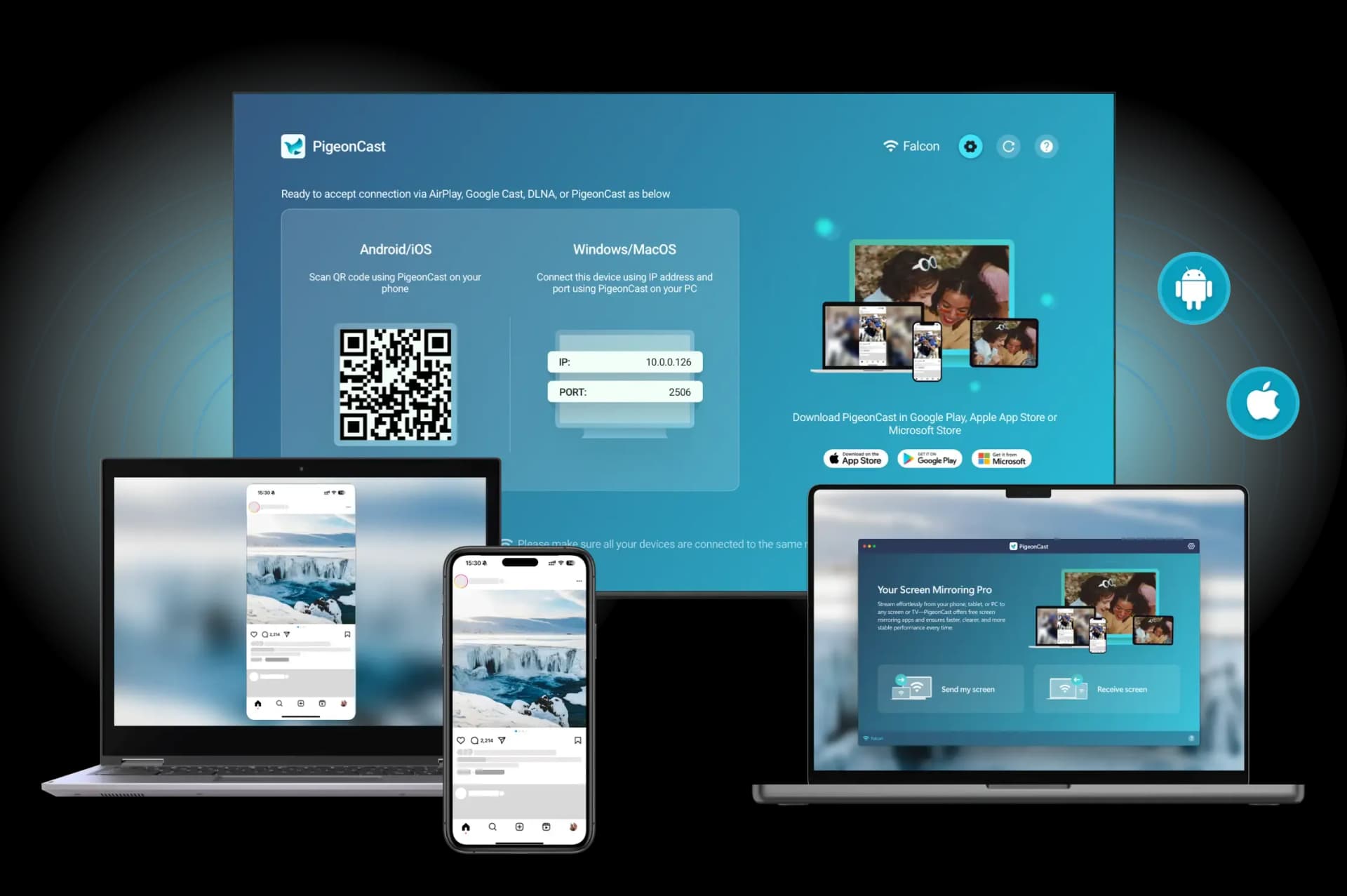
If you are choosing between NVIDIA Shield vs Apple TV for screen mirroring, the short answer is simple: Apple TV is usually the better choice for iPhone, iPad, and Mac users, while NVIDIA Shield is usually the better fit for Android phones and Google-leaning homes. If your household uses a mix of iPhone, Android, Windows, Mac, and different TV platforms, neither box is always the cleanest answer just for mirroring.
That distinction matters because these two devices are not built around the same sharing system. Apple TV centers on AirPlay, while NVIDIA Shield sits much closer to Google Cast and the broader Android TV world. Both can put content on a TV, but they do not make the same device pairings feel equally natural.
So if your real question is not "Which box streams more apps?" but "Which one makes casting and screen mirroring easier for my devices?" this is the comparison worth reading.
NVIDIA Shield vs Apple TV for Screen Mirroring: Quick Answer
Before getting into the details, here is the practical version:
- Choose Apple TV if you mainly use iPhone, iPad, or Mac
- Choose NVIDIA Shield if you mainly use Android phones and Google services
- Think twice before buying either one if your only goal is cross-platform mirroring
| Category | Apple TV | NVIDIA Shield |
|---|---|---|
| Best phone match | iPhone | Android |
| Best computer match | Mac | Any laptop with Chrome-based casting |
| Main mirroring path | AirPlay | Google Cast / Chromecast built-in |
| Mixed-device flexibility | Good for Apple-heavy homes | Good for Google-heavy or browser-based casting |
| Best for full-house cross-platform mirroring | Limited by Apple-first design | Broader laptop support via Chrome casting |
The table already shows the main tradeoff. Apple TV feels more natural when the sending device is made by Apple. NVIDIA Shield makes more sense when your phone and apps already live in Google’s world.
What Makes Apple TV and NVIDIA Shield Different for Mirroring
The biggest mistake people make in this comparison is treating mirroring like one universal feature. It is not.
iPhone and iPad can stream video or mirror a screen to Apple TV, an AirPlay-compatible smart TV, or a Mac when the devices are on the same Wi-Fi network. That makes Apple TV the most direct TV-side target when you already use Apple devices.
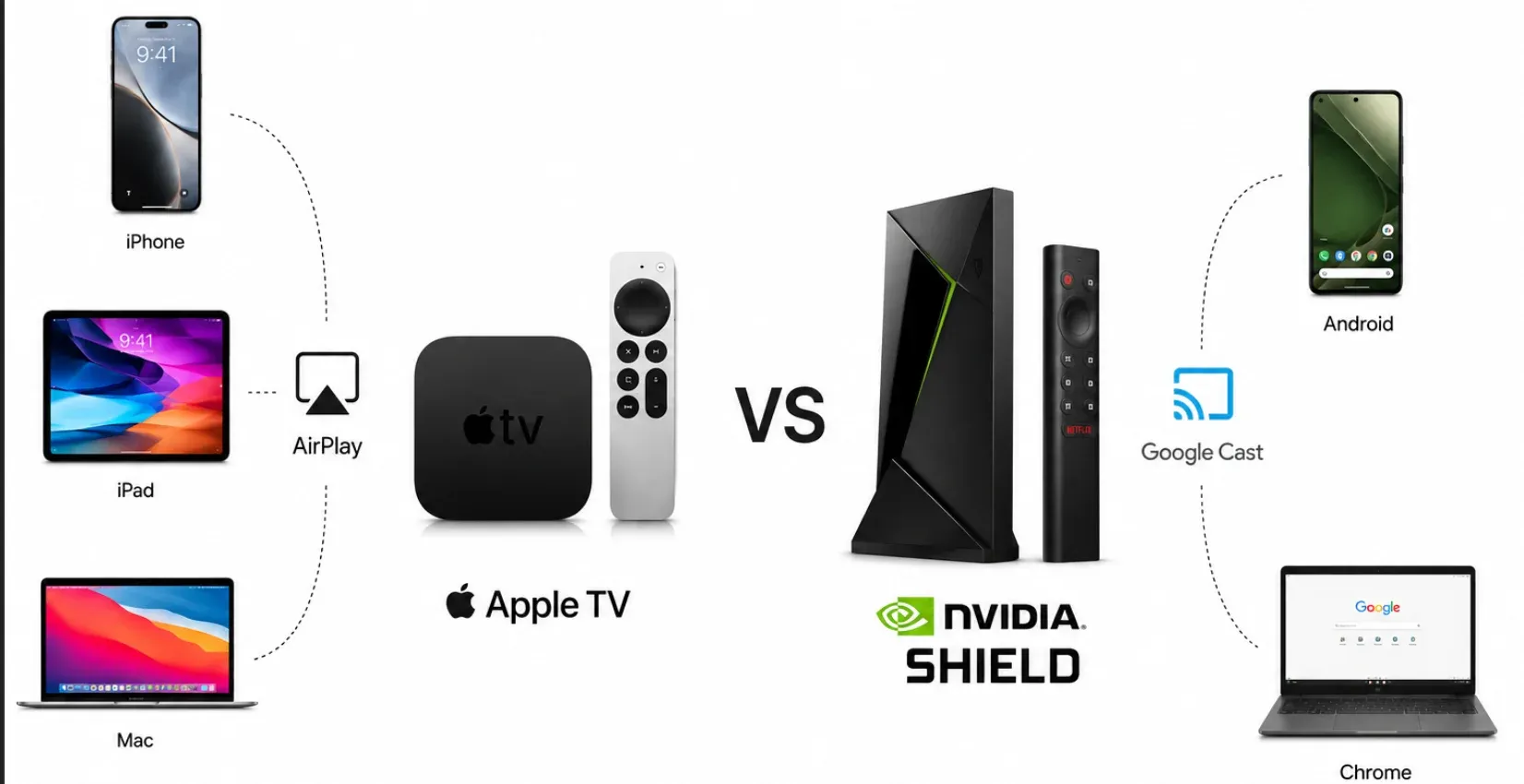
NVIDIA Shield, by contrast, is sold as a SHIELD TV device built on Google-centered TV software. NVIDIA highlights Google Assistant and casting from Chromecast apps, and Google explains Android screen casting through the Google Home app to supported Google streaming devices. In plain terms, Shield belongs more naturally to the Google Cast side of the TV world than to the AirPlay side.
That is why this comparison usually comes down to the sender, not just the box under the TV.
Is Apple TV Better for iPhone Screen Mirroring?
Yes, for most iPhone users, Apple TV is the easier answer.
You can mirror an iPhone or iPad by connecting to the same Wi-Fi network, opening Control Center, tapping Screen Mirroring, and choosing your Apple TV or other AirPlay target. That built-in path is the reason Apple TV continues to feel like the safest pick for iPhone-to-TV mirroring.
That does not mean every iPhone owner needs Apple TV. Many smart TVs now support AirPlay on their own, so some people can mirror iPhone to TV without Apple TV entirely. But if your TV does not already handle AirPlay well, Apple TV is still the most natural receiver for an iPhone, iPad, or Mac.
Apple TV also makes more sense when your mirroring habits are simple and frequent:
- showing photos from your iPhone on a bigger screen
- mirroring a presentation from an iPad
- sending a Mac screen to the TV
- staying inside one Apple-based home setup
How to Mirror iPhone, iPad, or Mac to Apple TV
The steps are short:
Step 1. Connect your iPhone, iPad, or Mac to the same Wi-Fi as Apple TV.
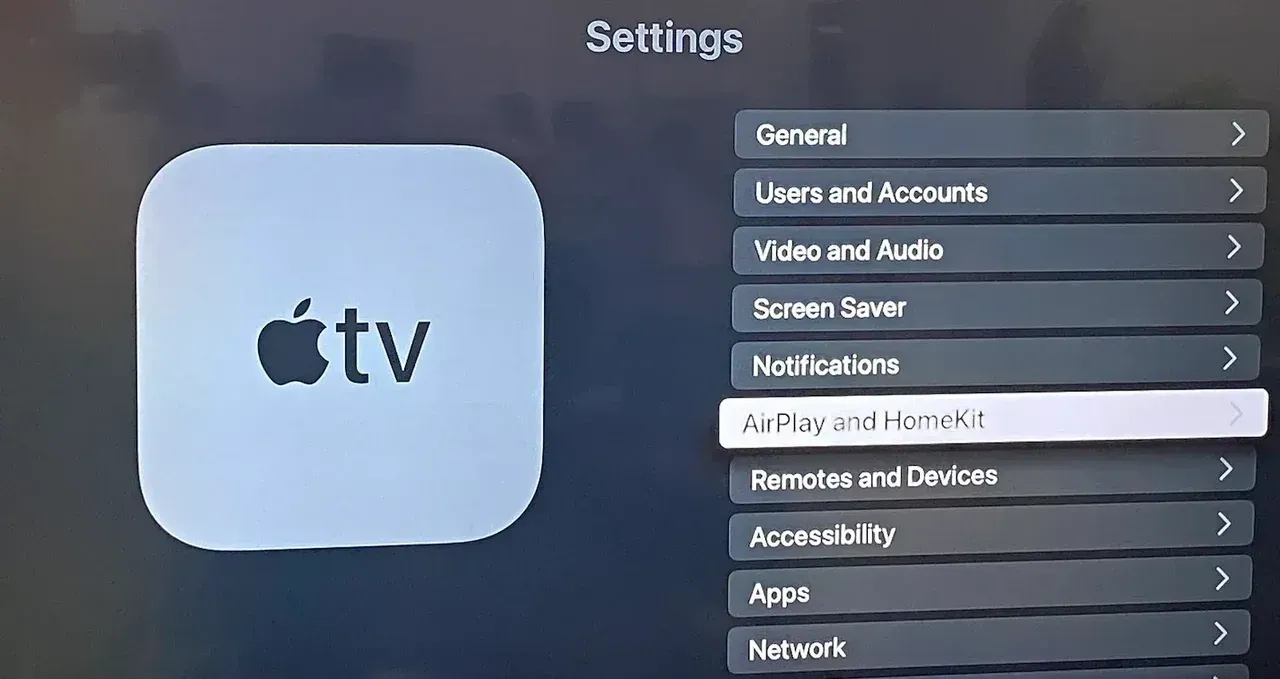
Step 2. Go to Settings > AirPlay and Homekit, turn on AirPlay, and set Allow Acess to Everyone or Anyone on the Same Network.
Step 3. Open Control Center and choose Screen Mirroring on your iPhone, iPad, or Mac.
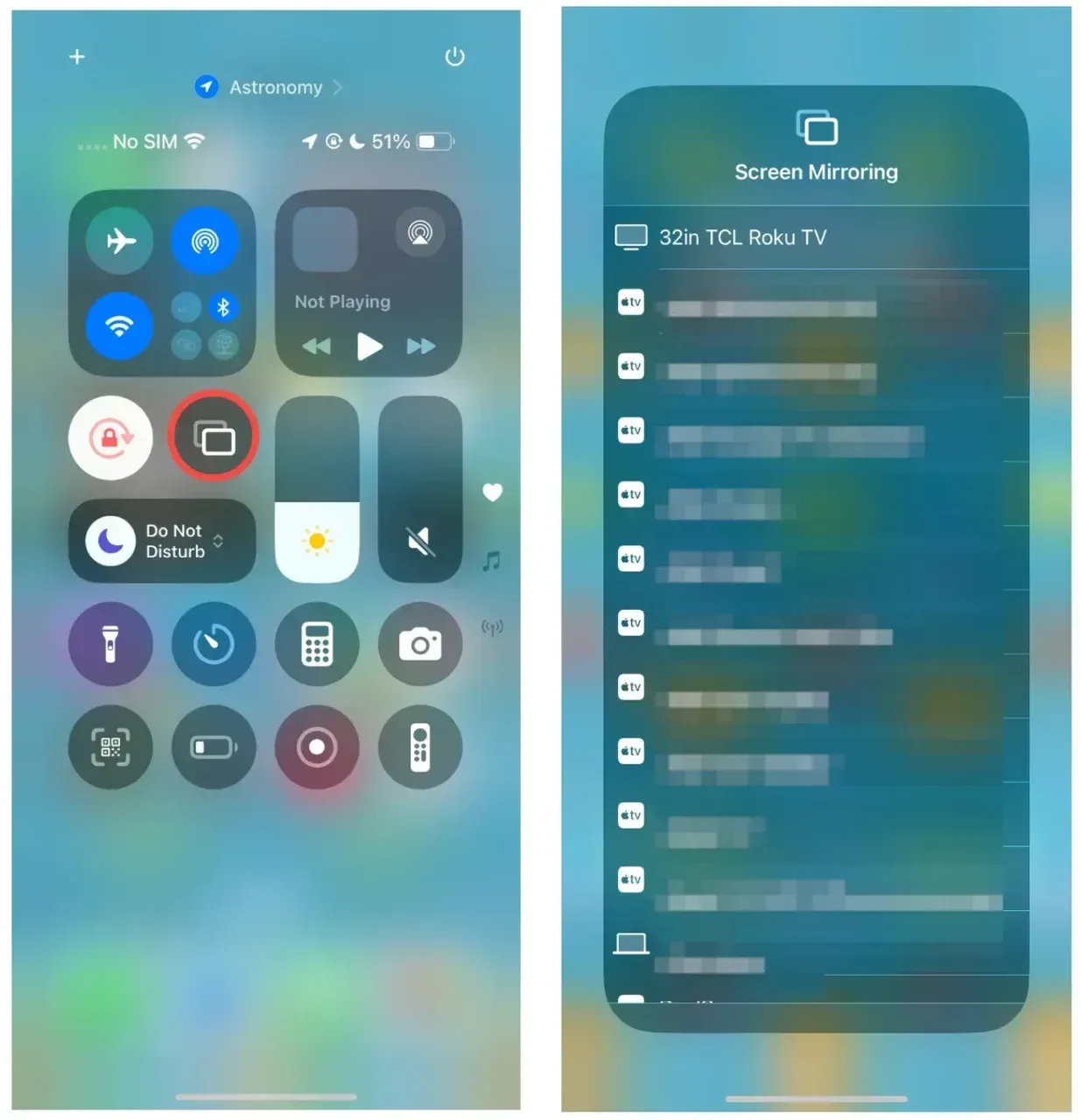
Step 4. Choose your Apple TV and enter the code on the TV if prompted.
Is NVIDIA Shield Better for Android Screen Mirroring?
Yes, for many Android users, NVIDIA Shield is the more natural choice.
Android users can mirror a screen from the Google Home app to a supported Google streaming device. Since NVIDIA Shield lives inside the Android TV and Google Cast side of the market, it usually makes more sense when your phone is Android and your TV habits already depend on Google apps and casting.
That gives Shield a few practical advantages in Android-heavy homes:
- Android phone users are more likely to find the casting path familiar
- Google-based services tend to fit the device better
- people who already use Android TV or Google TV habits will adjust faster
How to Mirror Android to NVIDIA Shield
For Android, the usual path is also simple:
Step 1. Connect your Android phone and Shield to the same Wi-Fi.
Step 2. Open the Google Home app on your phone.
Step 3. Select your Shield device.
Step 4. Tap Cast my screen.
Step 5. Confirm the cast request
If you cast from Chrome on a laptop, open the Chrome menu, choose Cast, then select Shield from the device list.
Which One Is Better for Mixed-Device Homes?
Neither device wins cleanly here.
If your home is mostly Apple, Apple TV is the safer choice. If your home is mostly Android and Google services, Shield is the better fit. But in a truly split household, both options can feel narrower than they first appear because each one favors its own sharing system.
That is usually the moment when the question changes from "Which streaming box is better?" to "What is the easiest way for everyone here to mirror a screen?"
Do You Even Need Apple TV or NVIDIA Shield Just for Mirroring?
Sometimes no.
If your TV already supports the sharing method you use most, you may not need another box at all. An iPhone user with a TV that already supports AirPlay may be fine without Apple TV. An Android user with a TV platform that already handles Google casting well may not need Shield just for that job.
This is especially true for people who want to:
- mirror iPhone one day and Android the next
- send a Windows laptop to the TV in a meeting
- switch between Mac, phone, and tablet without changing the whole TV setup
In those cases, buying another streaming box may solve more than you need.
When a Dedicated Mirroring App Makes More Sense
This is where a dedicated screen mirroring tool can be the better fit than either Apple TV or NVIDIA Shield.
If your real need is cross-platform screen mirroring between iPhone, Android, Windows, Mac, and smart TVs, a dedicated screen mirroring solution can remove a lot of the ecosystem limits that come with hardware-first choices.
That is the main reason a tool like PigeonCast can make more sense for some readers. It is not because Apple TV or NVIDIA Shield are bad devices. It is because they are both shaped by their own platform priorities. If your home does not want to pick one side, an app focused on screen mirroring itself can be the simpler answer.
This matters most when:
- you do not want Apple-only mirroring rules
- you do not want Android-only casting habits
- you care more about device flexibility than about buying another streaming box
The setup is also short:
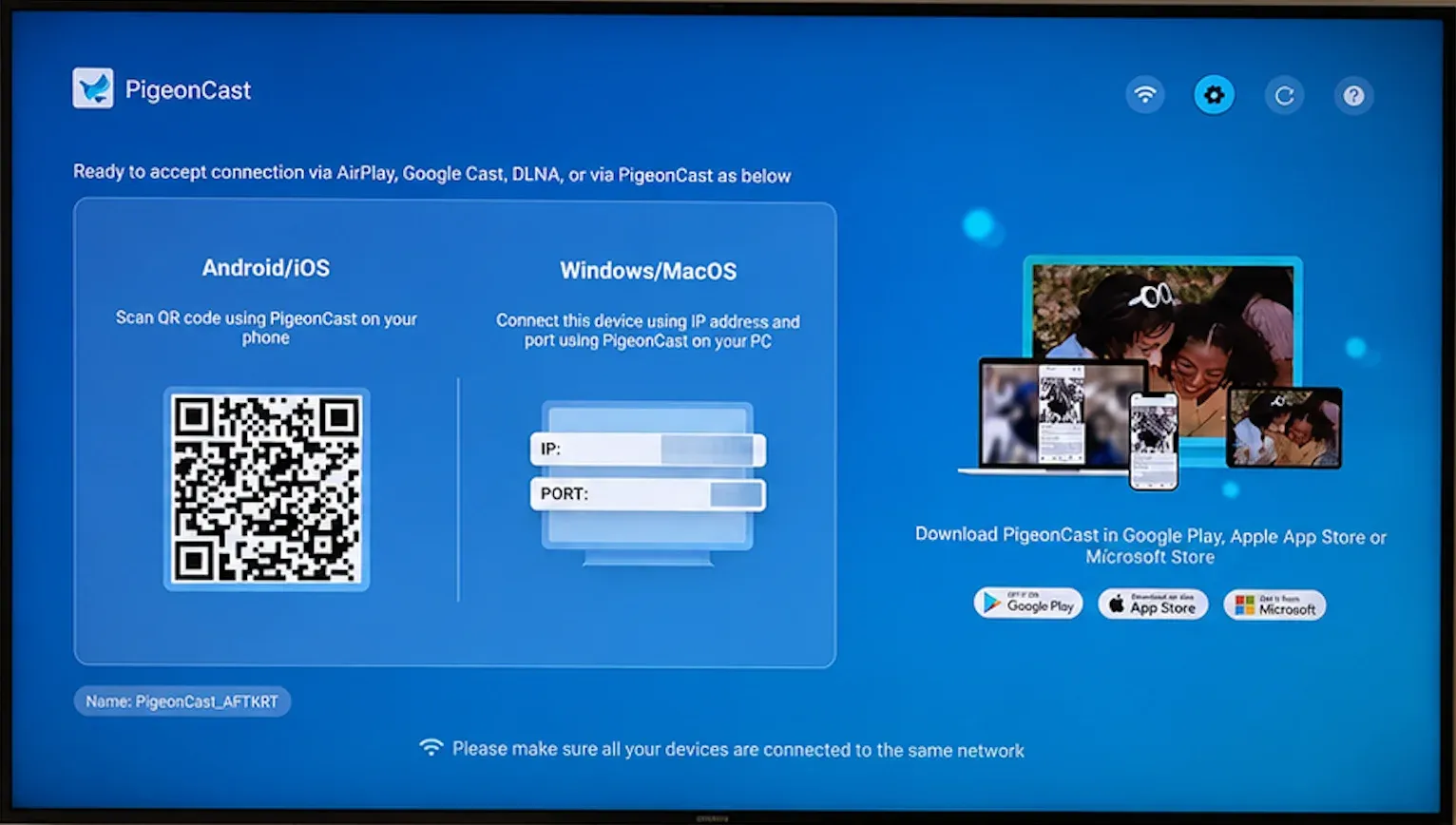
Step 1. Install PigeonCast on your phone or computer and on the TV side.


Overall Rating:



Step 2. Connect both devices to the same Wi-Fi.
Step 3. Open the app on both sides and choose the target TV.
Step 4. Tap Start Mirroring.
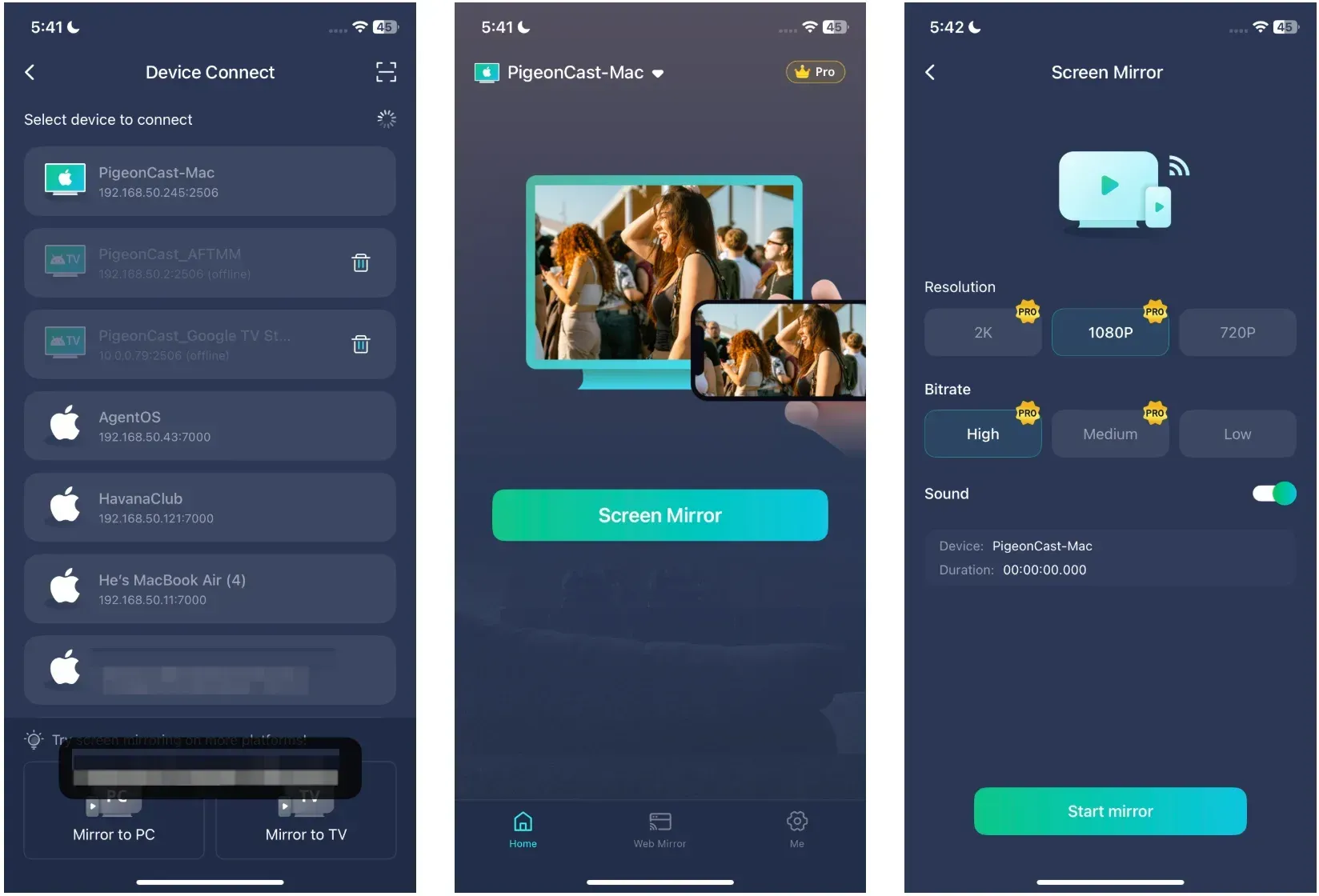
That is the main appeal. The steps stay brief, and you do not have to build the whole TV setup around Apple-only or Google-only sharing.
Final Verdict
If I were choosing only for screen mirroring, I would keep the decision simple. Apple TV is the better choice for most households because AirPlay is fast, reliable, and requires very little setup. It is the device that tends to create the fewest day-to-day frustrations.
NVIDIA Shield makes more sense for Android-heavy homes. It offers greater flexibility and works naturally with Google's ecosystem, making it a strong option for users who regularly mirror from Android devices.
In the end, the best choice is usually the one that matches the devices you already use every day.
NVIDIA Shield vs Apple TV FAQ
Is Apple TV better than NVIDIA Shield for iPhone mirroring?
Yes, in most cases. Apple TV is built around AirPlay, and Apple’s current support guidance makes iPhone and iPad mirroring to Apple TV very direct when both devices are on the same Wi-Fi network.
Is NVIDIA Shield better than Apple TV for Android casting?
Usually, yes. NVIDIA Shield fits the Google Cast and Android TV side better, so it often feels like the more natural pick when the sending device is an Android phone.
Can iPhone mirror to NVIDIA Shield natively?
You should not expect NVIDIA Shield to behave like an Apple TV for native iPhone mirroring. Shield is tied more closely to Google-centered casting, so iPhone users usually get a cleaner native experience with Apple TV or another AirPlay target.
Is Apple TV only for Apple users?
No, but it makes the most sense for Apple users. You can still use Apple TV as a streaming device in a mixed home, but its biggest mirroring strength comes from how well it works with iPhone, iPad, and Mac.
Is NVIDIA Shield only for Android users?
No, but Android users usually get more from it for casting. If your main goal is screen sharing from an Android phone or Google-based setup, Shield is easier to justify than it is for an iPhone-first home.
What is better for a house with iPhone, Android, Windows, and Mac together?
Neither Apple TV nor NVIDIA Shield is perfect for that mix if mirroring is the main priority. In that situation, a dedicated screen mirroring app may fit better because it is not tied so tightly to one company’s sharing system.
Mia Clarke is a technology editor specializing in screen mirroring and casting solutions across multiple platforms. Mia provides clear, practical guides and in-depth insights to help users seamlessly connect their devices. Passionate about enhancing digital experiences, Mia is dedicated to keeping readers updated on the latest trends and tools in cross-platform screen sharing. Whether you’re looking to mirror your smartphone, laptop, or smart TV, Mia’s content delivers reliable, user-friendly advice to simplify your tech setup.