
Miracast support on Sony Bravia TVs varies by model, which can make setup more confusing than it should be. Some Bravia TVs support screen mirroring directly, while others rely on different casting technologies.
This guide explains how to check whether your Sony Bravia supports Miracast, how to connect from compatible devices, what to do when Miracast isn't working, and which alternatives to use when your TV or device doesn't support it.
Does Your Sony Bravia TV Support Miracast?
Not every Sony Bravia TV supports Miracast. Sony provides Miracast through a feature called Screen mirroring, and its availability depends largely on the TV model and generation.
Which Sony Bravia TVs Support Miracast?
Miracast is mainly available on select older BRAVIA models, including some TVs released between 2013 and 2020. On supported models, the TV includes a dedicated Screen mirroring function that acts as the built-in Miracast receiver.
Sony's newer smart TV platforms are different:
- Google TV models do not support Miracast Screen mirroring.
- Android TV models released in 2020 or later generally do not support the Screen mirroring function.
- Earlier BRAVIA and Android TV models vary by model, so the release year alone is not enough to confirm support.
This distinction matters because Screen mirroring, Google Cast, and Wi-Fi Direct are separate features on Sony TVs. A Bravia may support Google Cast or Wi-Fi Direct without supporting Miracast.
How to Check Whether Your Bravia Has Miracast
The quickest way to confirm support is to check the TV's input or source menu.
Look for an option labeled Screen mirroring. If it appears as a selectable input, your Bravia has built-in Miracast support.
If Screen mirroring does not appear, check the specifications or Help Guide for your exact TV model. Sony notes that when the feature is absent from the input menu, that TV does not support Miracast Screen mirroring.
Once you've confirmed that both your Bravia and the device you want to mirror support Miracast, you can move on to the connection steps below.
How Miracast Actually Works on a Bravia TV
Miracast uses Wi-Fi Direct to create a direct wireless connection between your device and the Sony Bravia. It does not need a shared Wi-Fi network or an internet connection to transmit the screen.
Once connected, your phone, tablet, or PC captures its screen and audio in real time and sends them directly to the TV. The Bravia acts as a wireless display, so anything you do on the sending device — opening an app, switching windows, or playing a video — is mirrored on the TV at the same time.
This is different from technologies such as Google Cast, where the TV can receive and play content independently after you start casting. With Miracast, the sending device remains responsible for the entire mirrored session, making it work more like a wireless HDMI connection.
For a closer look at how these technologies differ, see AirPlay, DLNA, Cast, and Miracast compared.
How Do I Use Miracast to Connect to a Sony Bravia TV?
Once you've confirmed that your Sony Bravia and sending device support Miracast, the connection is straightforward: open Screen mirroring on the TV, then start wireless display or screen mirroring from your phone or PC.
Enable Screen Mirroring on Your Sony Bravia
Step 1. Press the Input or Source button on your Sony Bravia remote.
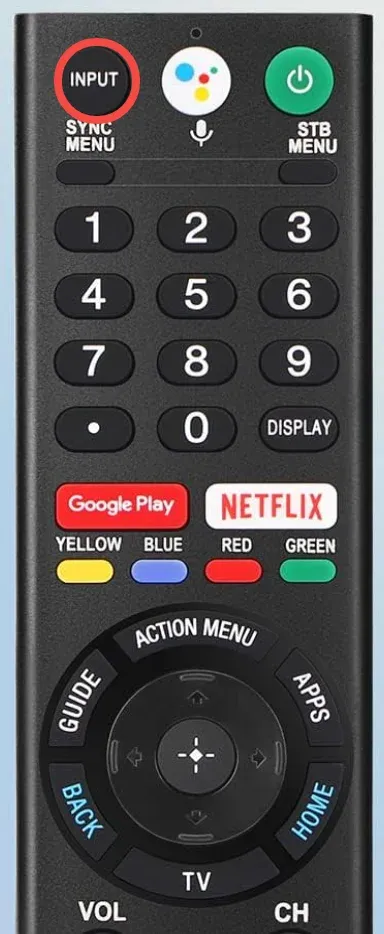
Step 2. Select Screen mirroring.
Step 3. Leave the Screen mirroring screen open while you connect from your other device.
Your Bravia is now ready to appear as an available Miracast display.
Connect an Android Phone or Tablet
The exact menu name varies by manufacturer. Look for a feature such as Smart View, Screen mirroring, Wireless display, or Cast screen that supports Miracast.
To screen mirror Android to Sony TV, you need to:
Step 1. Open your phone's screen mirroring or wireless display feature.
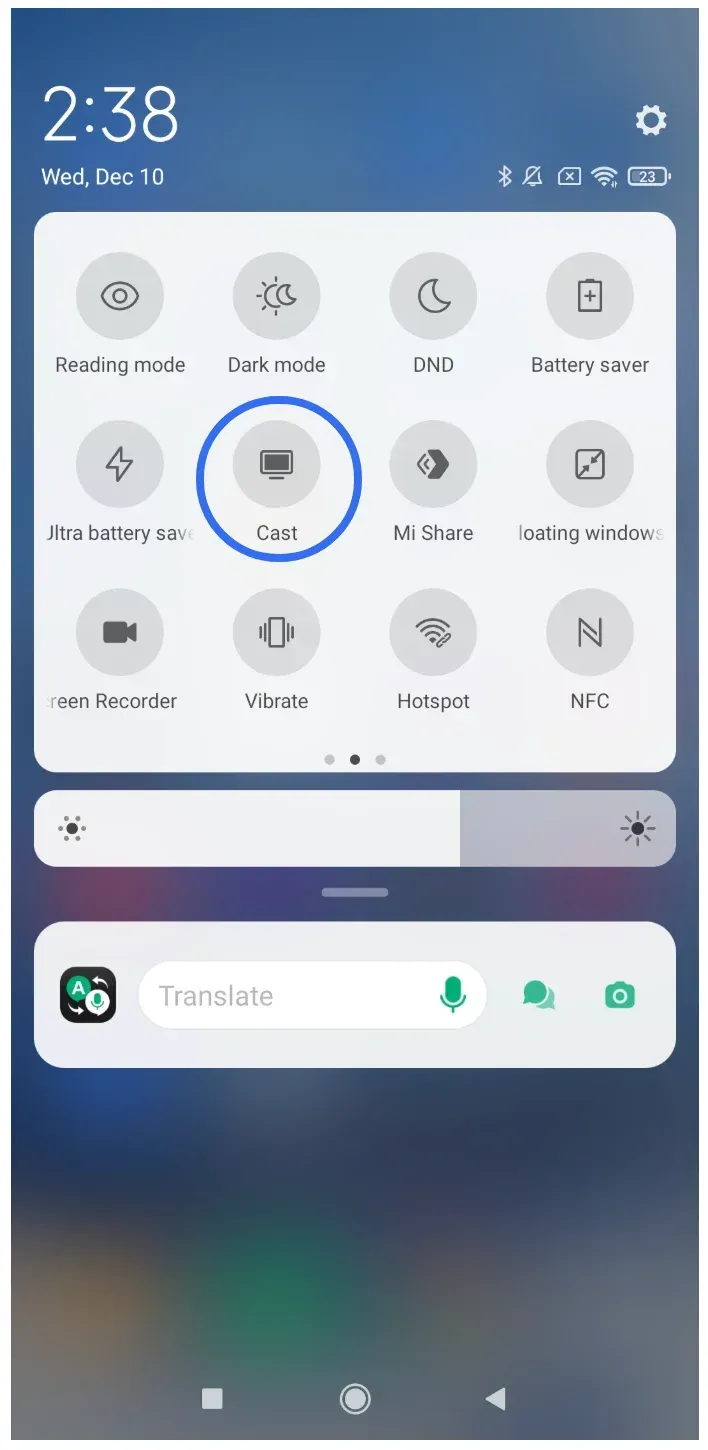
Step 2. Wait for the available displays to appear.
Step 3. Select your Sony Bravia.
Step 4. Accept the connection request on the TV if prompted.
Samsung devices, for example, typically use Smart View, while other manufacturers may place Miracast under their connection or display settings.
If you're unsure where your device's Miracast controls are located, see our guide to using Miracast on Android.
Connect a Windows PC
Windows includes native Miracast support on compatible PCs.
Step 1. Press Windows + K on your PC.
Step 2. Select your Sony Bravia from the available displays.
Step 3. Accept the connection request on the TV if prompted.
You can also access wireless display settings through Windows Settings, but Windows + K is usually the quickest method.
For a more detailed Windows walkthrough, see how to connect a PC to a Sony Bravia wirelessly.
Why iPhone Can't Use Miracast on a Sony Bravia TV
iPhone and iPad do not support Miracast, so they cannot connect to a Sony Bravia through its Screen mirroring input.
Apple uses AirPlay for wireless screen mirroring instead of Miracast. As a result, opening Screen Mirroring on an iPhone will only show compatible AirPlay receivers, not a Bravia that is waiting for a Miracast connection.
If your Sony Bravia supports AirPlay, use that instead. AirPlay availability depends on the specific TV model and firmware, so check for Apple AirPlay & HomeKit in the TV settings or confirm support for your exact model.
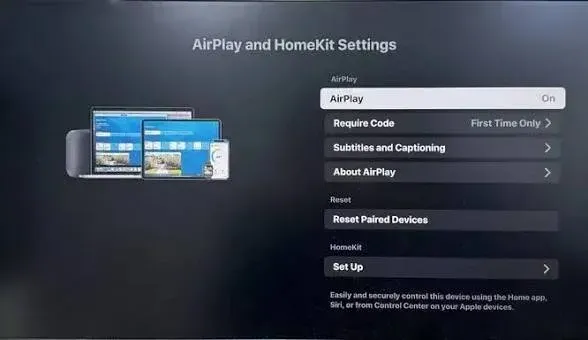
If your Bravia does not support AirPlay, you'll need to use another casting or screen-sharing method rather than Miracast.
Sony Bravia Miracast Not Working: Common Fixes
If your Sony Bravia does not appear as an available Miracast display, or the connection keeps failing, check the following in order.
1. Confirm Both Devices Support Miracast
First, make sure your Bravia has a Screen mirroring input and that the phone, tablet, or PC you're connecting from supports Miracast.
If either device does not support Miracast, changing settings or restarting the connection will not fix the problem.
You can also check our troubleshooting guide on your device does not support Miracast.
2. Keep Screen Mirroring Open on the TV
Your Bravia needs to remain on the Screen mirroring screen while the other device searches for wireless displays.
If you return to the home screen or switch to another input, the TV may stop appearing as an available Miracast receiver.
3. Disconnect Other Wireless Displays
If your phone or PC is already connected to another wireless display, disconnect it before trying to connect to the Bravia.
Then reopen the wireless display menu and search for the TV again.
4. Restart the Miracast Connection
If the TV appears but pairing fails, cancel the connection and start again from a fresh Screen mirroring session.
If necessary, restart both the Bravia and the sending device before retrying.
5. Check for Software Updates
Outdated TV firmware or device drivers can sometimes cause wireless display problems. Check for available system updates on the Bravia and update the sending device before trying again.
If you're connecting from Windows, also make sure your graphics and wireless network drivers are up to date.
If Miracast still does not connect after these checks, the problem may be related to the sending device, wireless adapter, or Miracast configuration rather than the Sony TV itself.
See our Miracast not working troubleshooting guide for more detailed fixes.
When to Use Something Other Than Miracast
Miracast works best when both your Sony Bravia and the sending device support it and you specifically want to mirror the entire screen in real time.
But it may not be the best option if your Bravia does not include Screen mirroring, your device does not support Miracast, or you need to share content from different types of devices.
In those cases, a cross-platform casting solution can be more practical.
Use PigeonCast for Broader Device Compatibility
PigeonCast supports casting from Android phones, iPhones, Windows PCs, and Macs to compatible Sony Android TV and Google TV devices.
That makes it useful in situations where Miracast compatibility becomes a limitation, such as:
- your Sony Google TV does not support Miracast;
- you want to cast from an iPhone or Mac; *-different people need to share from Android, iOS, Windows, and macOS devices; *-you want one casting method instead of relying on different screen-mirroring standards for each device.
Getting started is simple:


Overall Rating:



Step 1. Open PigeonCast on your Sony Android TV or Google TV.
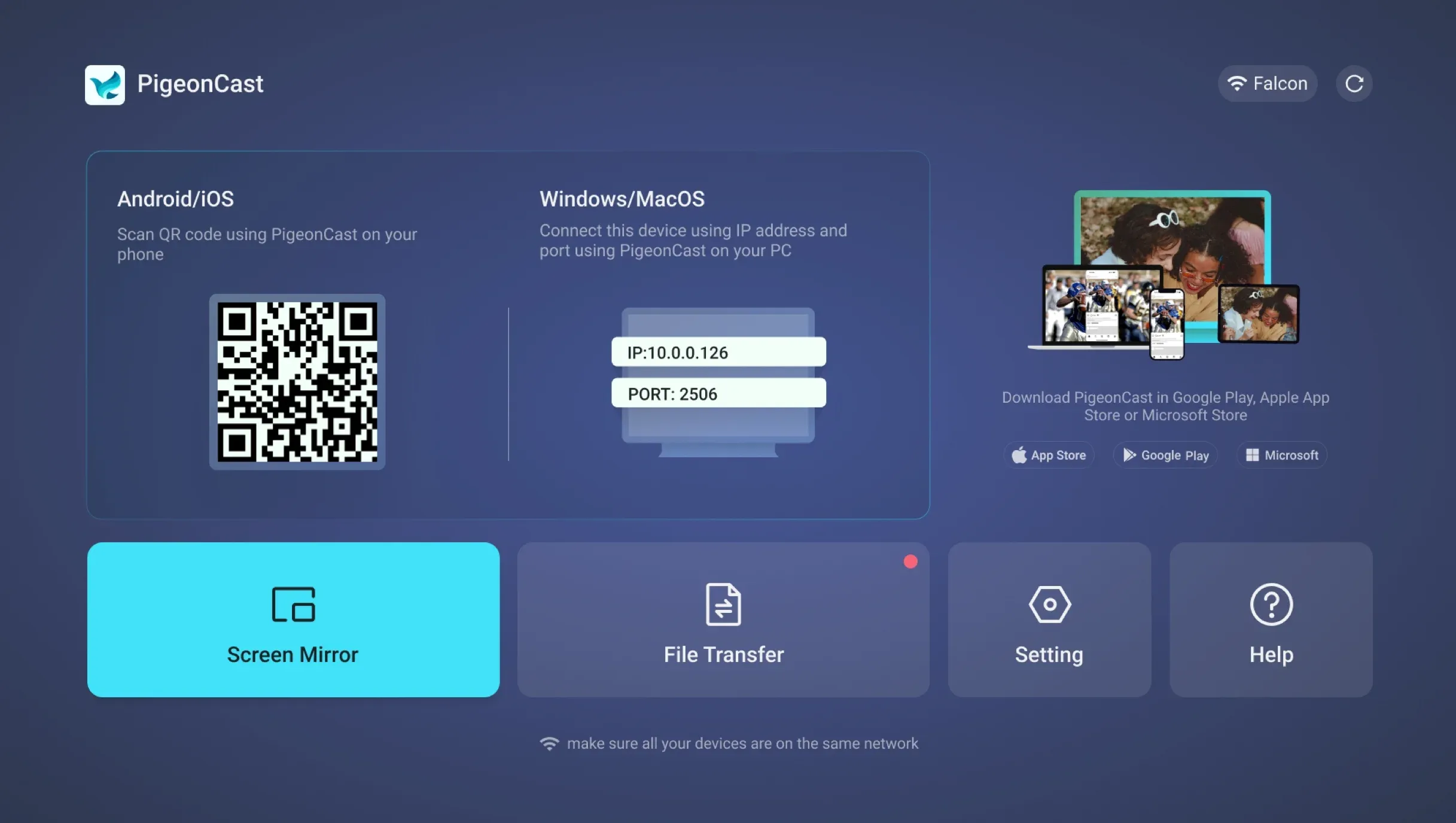
Step 2. Open PigeonCast on your Android phone, iPhone, Windows PC, or Mac.
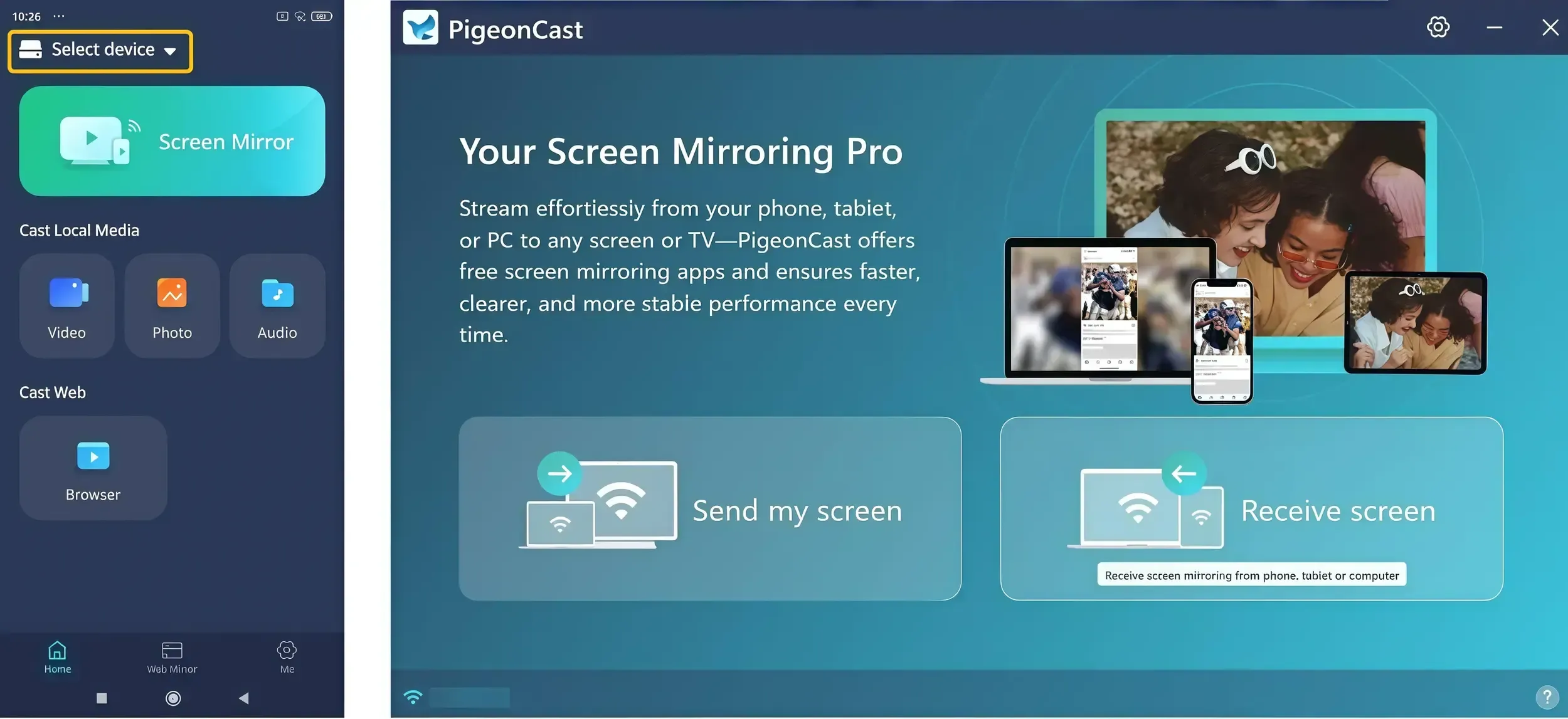
Step 3. Ensure your sending device and Sony TV are on the same Wi-Fi network.
Step 4. Select your Sony TV from the available devices.
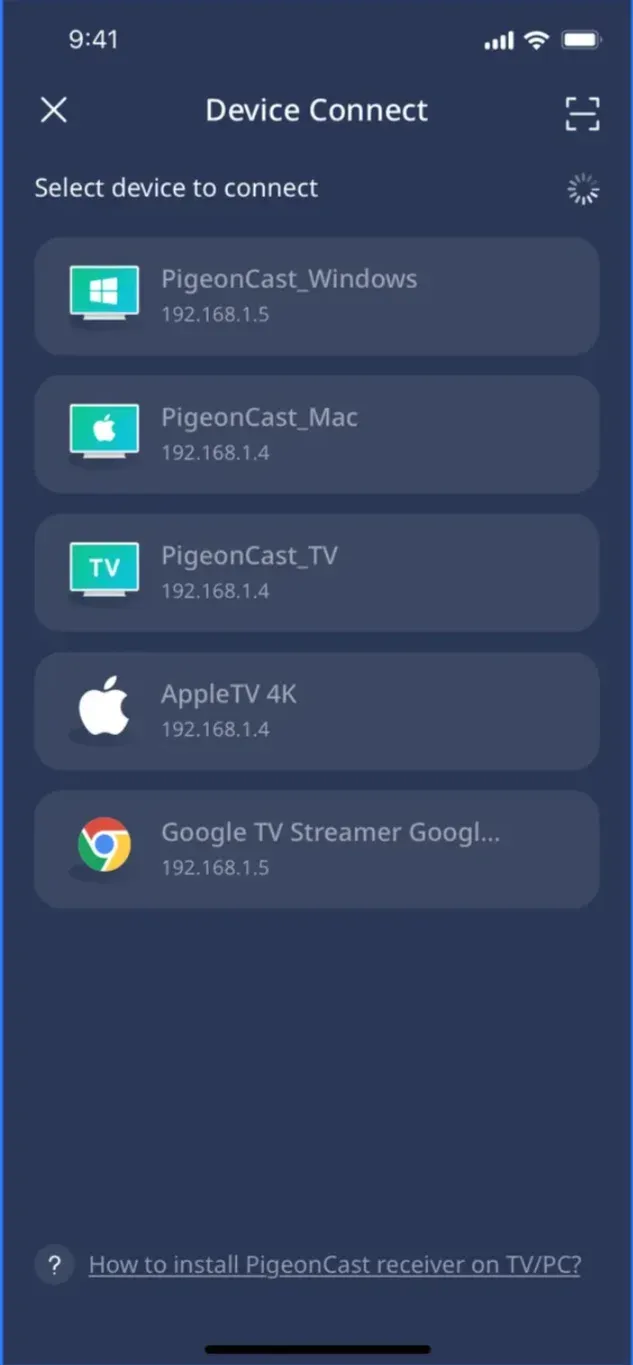
Step 5. Choose the content or screen you want to cast and start sharing.
If Miracast compatibility is getting in the way, try the screen mirroring app for Sony TV to cast across Android, iPhone, Windows, and Mac.
Conclusion
Miracast can still be a convenient way to mirror a compatible device to a Sony Bravia, but it only makes sense when both sides support the same standard.
If your Bravia has Screen mirroring and your Android device or Windows PC supports Miracast, the native connection is usually the simplest option. If compatibility is the problem — especially with newer Sony Google TVs, iPhones, Macs, or mixed-device environments — switching to a broader casting solution can save more time than continuing to troubleshoot Miracast.
The key is to choose the method that fits the devices you actually use. Miracast remains useful for direct screen mirroring, while solutions such as PigeonCast make more sense when you need to cast across Android, iPhone, Windows, and Mac to compatible Sony Android TV and Google TV devices.
Sony Bravia Miracast FAQ
Does Miracast affect video quality on a Sony Bravia?
Miracast mirrors the screen in real time, so picture quality can vary with the sending device, wireless conditions, and the resolution supported by both devices. It may not always match the quality of playing the same video directly on the TV.
Is there a delay when using Miracast on a Sony Bravia?
Some latency is normal because the sending device has to capture, encode, transmit, and display the screen wirelessly. The delay may be barely noticeable for photos or presentations but more obvious during fast-paced games or other latency-sensitive tasks.
How close should my device be to the Sony Bravia when using Miracast?
Miracast uses a direct wireless connection, so keeping the sending device reasonably close to the TV generally provides a more stable connection. Walls, interference, and greater distance can reduce reliability.
Can I keep using my phone or PC while Miracast is connected?
Yes, but everything shown on the sending device is mirrored to the TV. Switching apps, opening notifications, or moving between windows will also appear on the Bravia until you disconnect the Miracast session.
Why does some streaming content show a black screen over Miracast?
Some streaming services use DRM or other content-protection technologies that can restrict screen mirroring. In those cases, the app interface may appear on the TV while the protected video itself remains black or fails to play.
Mia Clarke is a technology editor specializing in screen mirroring and casting solutions across multiple platforms. Mia provides clear, practical guides and in-depth insights to help users seamlessly connect their devices. Passionate about enhancing digital experiences, Mia is dedicated to keeping readers updated on the latest trends and tools in cross-platform screen sharing. Whether you’re looking to mirror your smartphone, laptop, or smart TV, Mia’s content delivers reliable, user-friendly advice to simplify your tech setup.