
If you are researching AirPlay vs DLNA vs Cast vs Miracast, the core truth is that these four are not interchangeable tools. They belong to different delivery models, so performance, compatibility, and failure behavior are different by design.
This guide gives a complete decision model: quick table, protocol internals, performance tradeoffs, scenario picks, and a reliable third-party solution.
AirPlay vs DLNA vs Cast vs Miracast Quick Comparison Table
Miracast vs Chromecast vs AirPlay, which is the best solution? Start with this table before touching settings menus. It prevents the most common mistake: trying to force one protocol to do a job it was not designed for.
| Protocol | Primary Job | Screen Mirroring | App Streaming | Typical Device Fit | Connection Style | Common Failure Pattern |
|---|---|---|---|---|---|---|
| AirPlay | Apple-centric media and mirroring | Yes | Yes | iPhone, iPad, Mac, Apple TV, AirPlay-enabled TVs | Shared LAN discovery and streaming | Non-Apple receiver limits, LAN discovery issues |
| DLNA | Local media sharing | No (true mirror not its core model) | Limited to local library-style playback | NAS, PC media servers, older smart TVs | UPnP discovery on same LAN | Works for local files but not modern app casting workflows |
| Cast (Google Cast) | App-controlled receiver playback | Partial (full mirror in some cases) | Yes | Android, Chrome browser, Chromecast, Google TV | Sender controls receiver, receiver often streams directly | Cast target appears but app session handoff fails |
| Miracast | Full display duplication | Yes | No native app handoff model | Windows devices, some Android devices, supported TVs/adapters | Wi-Fi Direct peer-to-peer | Session lag, dropouts, or protected app playback limits |
Fast decision order:
-
Apple sender plus AirPlay target: start with AirPlay.
-
Google ecosystem and OTT app casting (like YouTube, Netflix, Apple Music, Slack): start with Cast.
-
Local NAS or PC media library to TV: test DLNA early.
-
Full desktop projection with restrictive router policies: test Miracast.
If your first protocol fails after one clean attempt cycle, switch protocol class instead of repeating the same menu path.
How AirPlay, DLNA, Cast, and Miracast Work
This is where most "mystery failures" become predictable. The mechanism behind each protocol determines compatibility, latency, and which content types are reliable.
Casting protocol compatibility gaps are not accidental: they are a direct consequence of how these systems are designed to operate independently rather than as a unified standard.
In mixed environments that combine Apple, Android, Windows, and a wide range of TV implementations, these differences often surface as fragmented experiences: one protocol works in one scenario, fails in another, and requires constant switching.
Some users address this fragmentation by introducing a unified screen mirroring workflow to reduce protocol-specific troubleshooting, especially in setups where cross-platform consistency matters.
Understanding how each protocol works at a deeper level is what turns these seemingly inconsistent behaviors into predictable patterns.
AirPlay: Ecosystem-Optimized LAN Streaming and Mirroring
AirPlay is Apple's proprietary wireless media and display protocol, originally introduced as part of its broader ecosystem strategy for seamless device interoperability. Unlike open standards governed by industry alliances, AirPlay is defined and controlled by Apple, which means its behavior is tightly coupled with Apple's hardware, software stack, and certification program for third-party receivers.
From a protocol perspective, AirPlay operates as a hybrid system that combines media streaming and real-time display encoding, rather than committing to a single transmission model. In practice, it supports two different behaviors:
-
Media streaming from an app to a receiver.
-
Full screen mirroring from a sender to a display.
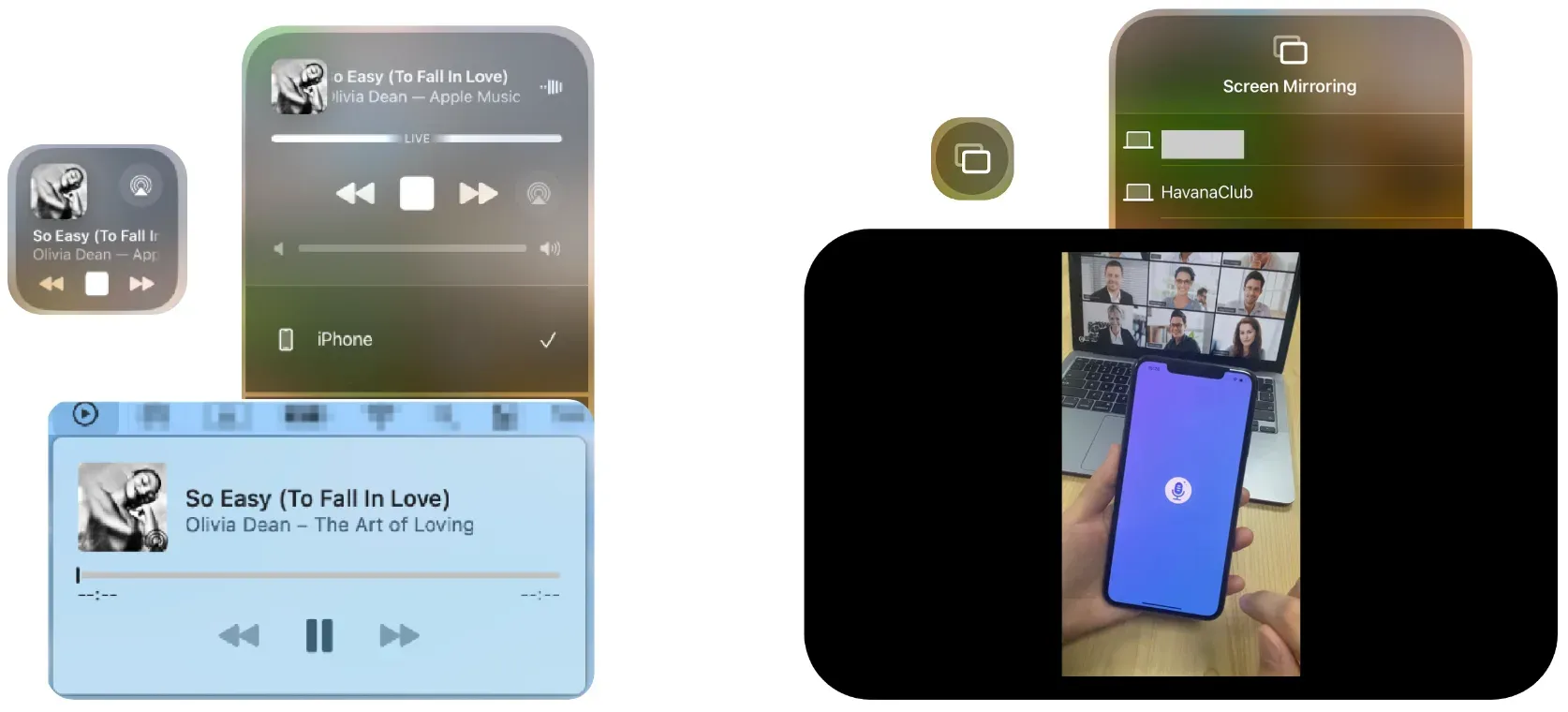
These two modes are not just feature variations — they rely on different underlying mechanisms.
In streaming mode, AirPlay typically uses RTSP (Real-Time Streaming Protocol) for session control and HTTP Live Streaming (HLS) for media delivery. In this model, the sender coordinates playback, while the receiver buffers and renders the stream, often with support for Apple's FairPlay DRM when protected content is involved.
In mirroring mode, the architecture shifts. The sender device encodes its screen in real time (commonly using H.264 or H.265), compresses the video stream, and transmits it continuously to the receiver. This is why mirroring introduces more sensitivity to network stability and encoding load compared to app-based streaming.
AirPlay discovery relies on Bonjour (mDNS) within the local network, which allows devices to advertise and discover services without manual configuration. This LAN-based discovery model works reliably when devices share the same network segment, but it also explains a common limitation: discovery and playback depend heavily on network topology, firewall behavior, and router configuration.
This design leads to a predictable pattern:
-
In Apple-to-Apple environments, where both protocol implementation and hardware acceleration are aligned, pairing and playback are typically smooth.
-
In mixed ecosystems, compatibility depends on how closely third-party receivers implement Apple's specifications, including codec support, DRM handling, and firmware quality.
In other words, AirPlay is not just a protocol; it is an ecosystem-optimized transport layer, where performance consistency comes from vertical integration rather than universal interoperability.
DLNA: UPnP-Based Local Media Architecture
DLNA (Digital Living Network Alliance) is one of the earliest widely adopted home media interoperability frameworks, developed by the Digital Living Network Alliance, a consortium of consumer electronics manufacturers.

Unlike ecosystem-driven protocols such as AirPlay or Cast, DLNA is built on open networking standards, primarily UPnP (Universal Plug and Play), which defines how devices discover each other and exchange media over a local network.
At its core, DLNA is not a casting protocol in the modern sense. It implements a role-based architecture, where devices are divided into functional components such as media server, media renderer, and control point. This structure reflects its original design goal: enabling distributed media access across devices, rather than real-time screen transmission.
Instead of "mirror my phone now", DLNA operates closer to: locate a media file on the network, then instruct a renderer to fetch and play it.
From a protocol perspective, discovery typically relies on SSDP (Simple Service Discovery Protocol) within UPnP, while media transfer is handled over standard HTTP streaming. This means the playback device (renderer) pulls the content directly from the server, rather than receiving a continuous encoded stream from the sender.
This architectural choice explains both its strengths and limitations:
-
It is highly stable for local media playback, especially from NAS systems or PC-based libraries
-
It avoids real-time encoding overhead, making it efficient for large file streaming
-
But it lacks a native model for app-driven streaming or DRM-controlled content, which are central to modern OTT services
That is why DLNA continues to survive in NAS and legacy TV ecosystems, where file-based media remains common. At the same time, it often disappoints users who expect behavior similar to AirPlay or Cast, because it was never designed for interactive, app-centric workflows.
In essence, DLNA represents a content distribution architecture, not a screen sharing system, and most usability gaps come from applying it outside that context.
Google Cast: Control-Plane Handoff to Receiver Playback
Google Cast, developed by Google, represents a fundamentally different approach to media transmission; one that separates control logic from data flow.
Rather than streaming content directly from the sender device, Cast operates as a control-plane protocol, where the sender initiates and manages playback, but the receiver is responsible for fetching and rendering the media.
This architecture is built on technologies such as mDNS for discovery, DIAL (Discovery and Launch) for session initiation, and HTTPS-based streaming handled by the receiver's runtime (often referred to as a Web Receiver). Together, these components form a system where the sender device acts more like a controller than a transport endpoint.
The typical workflow illustrates this clearly:
-
The sender discovers available Cast devices on the local network
-
It initiates an application session on the receiver
-
The receiver retrieves the media stream directly from the internet
-
The sender maintains control over playback state (pause, seek, stop)
This model explains why Cast behaves differently from both AirPlay and Miracast.
There are two common usage paths:
-
Native Cast-enabled app workflow
-
Browser tab casting workflow, where the sender performs encoding
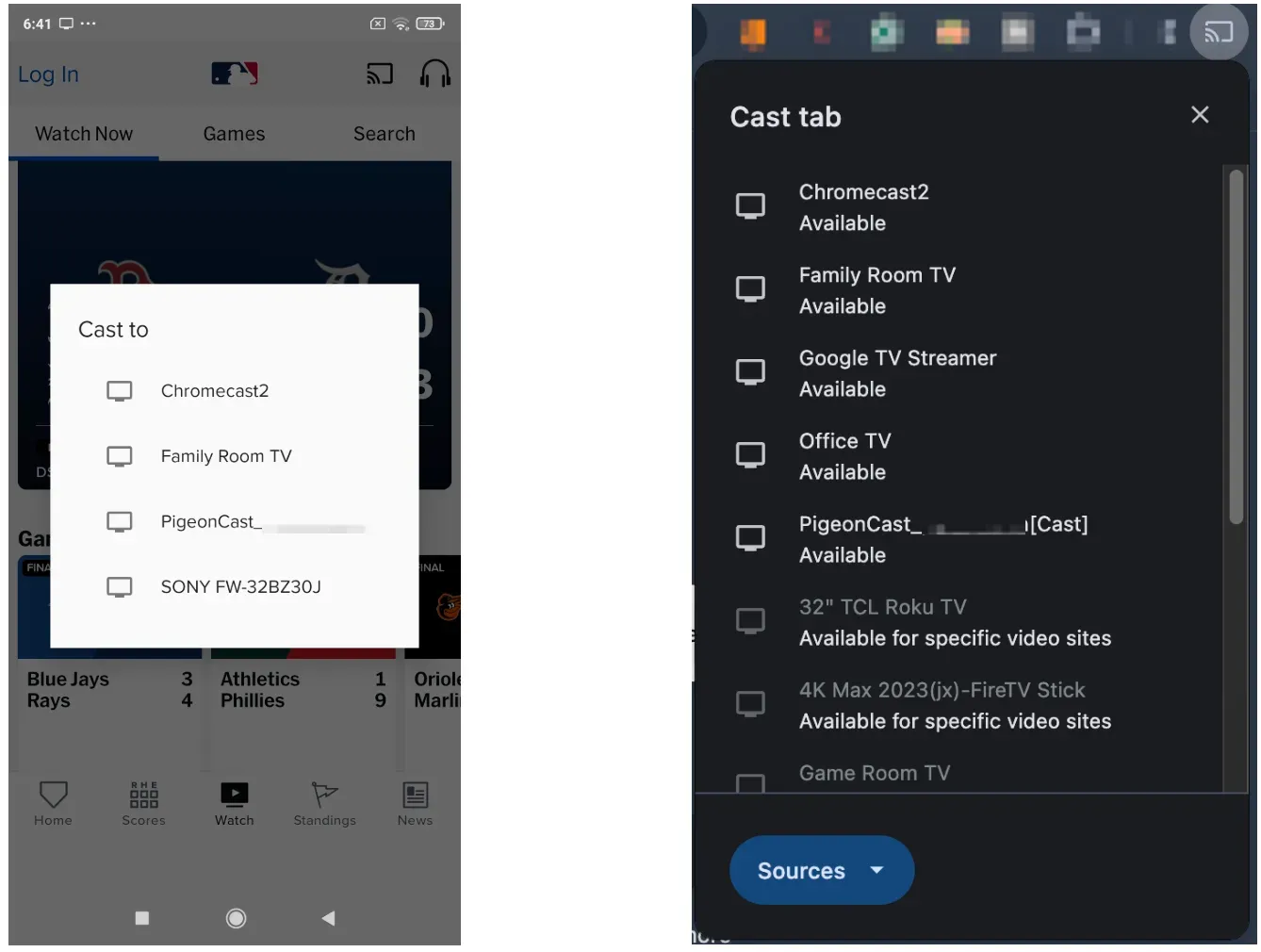
In the first case, the sender's resource usage remains low because it is not responsible for streaming media. In the second, the sender temporarily behaves more like a mirroring system, which increases CPU and network load.
This separation of control and playback leads to several practical effects:
-
Long sessions are more stable because the receiver handles streaming independently
-
Battery and performance impact on the sender device are reduced
-
Playback quality is often higher, as the receiver can adapt stream quality directly
However, it also introduces a distinct failure mode: a device may be discoverable, but playback fails. This typically occurs when the application session handshake fails, rather than the network connection itself. In other words, discovery success does not guarantee that the receiver can execute the requested app workflow.
In environments with Google TV or Chromecast, Cast is usually the most efficient option for mainstream streaming apps. Its behavior is best understood as a remote execution model, rather than a traditional streaming pipeline.
Miracast: Wi-Fi Direct Full-Screen Duplication
Miracast, standardized by the Wi-Fi Alliance, is designed around a single, clear objective: wireless display mirroring. Unlike AirPlay and Cast, which often depend on a shared network infrastructure, Miracast establishes a direct peer-to-peer connection using Wi-Fi Direct, effectively bypassing the traditional router-based topology.
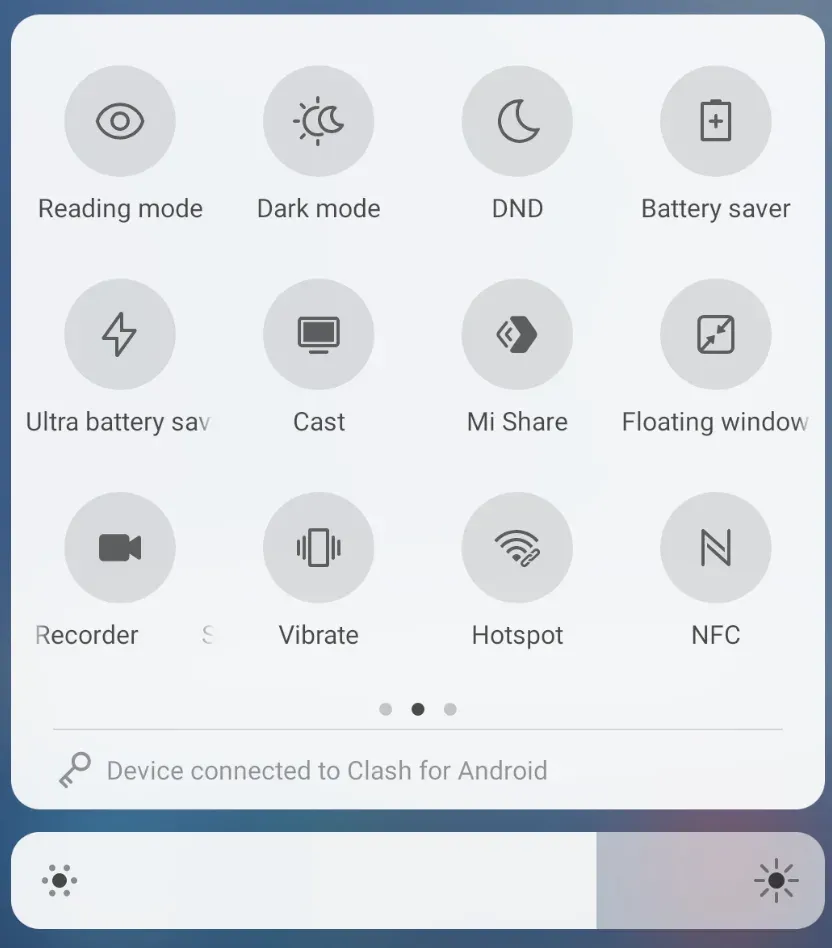
At the protocol level, Miracast functions as a real-time streaming system. The sender encodes its entire display output — typically using H.264 video compression — and transmits it continuously to the receiver over a secured Wi-Fi Direct link (usually protected with WPA2). This is why it is often described as "wireless HDMI": it replicates the behavior of a physical cable, but over a wireless channel.
This design has important implications.
Because the connection is direct:
-
It can operate in environments where LAN-based discovery fails
-
It is less dependent on router configuration or network segmentation
-
It is suitable for controlled environments such as meeting rooms or classrooms
However, the simplicity of the model also introduces tradeoffs:
-
The sender must perform continuous real-time encoding, increasing CPU/GPU load
-
Latency is inherently higher and more variable compared to receiver-driven models
-
Performance is sensitive to RF conditions, interference, and device implementation
Additionally, Miracast does not include a native abstraction for app-level streaming or content negotiation. Everything is treated as a video stream, which limits flexibility when dealing with protected content or adaptive streaming scenarios.
This explains its typical behavior:
-
It is effective for full-screen projection and presentations
-
It is less efficient for media streaming workflows
-
It can exhibit instability under high-resolution or high-frame-rate conditions
In summary, Miracast is best understood as a transport-level screen replication protocol, prioritizing directness and simplicity over adaptability. Its strengths and weaknesses both stem from that design choice.
These architectural differences are not just theoretical. They directly translate into measurable differences in latency, resolution, and network behavior.
In other words, what feels like "random performance issues" is usually a predictable result of how each protocol is designed to move data.
A simplified comparison looks like this:
| Protocol | Latency | Max Resolution | Encoding Model | Network Dependency |
|---|---|---|---|---|
| AirPlay | ~100–300 ms | Up to 4K | Real-time encode (mirroring) / stream (app) | LAN |
| Cast | ~80–200 ms | Up to 4K HDR | Receiver-side streaming (no full encode) | LAN + Internet |
| Miracast | ~150–500 ms | Up to 1080p | Continuous real-time encoding | Wi-Fi Direct |
| DLNA | Not real-time | File dependent | No re-encoding (direct file playback) | LAN |
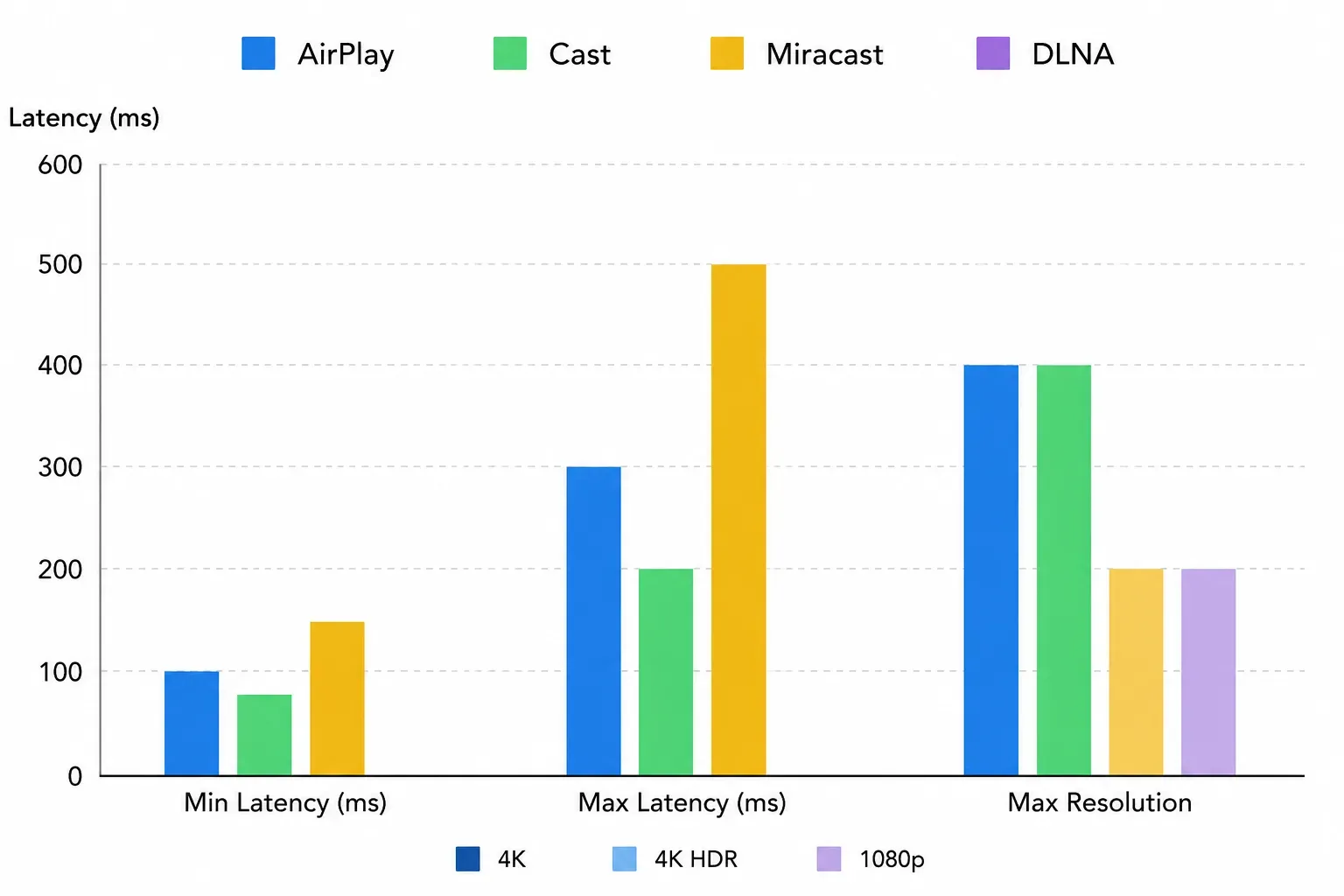
These numbers are not strict guarantees, but they reflect typical behavior under stable conditions. More importantly, they align with the underlying architecture:
-
Protocols that offload playback to the receiver (like Cast) tend to be more stable and efficient
-
Protocols that rely on real-time screen encoding (like Miracast and AirPlay mirroring) introduce latency and variability
-
File-based systems (like DLNA) avoid latency issues entirely, but sacrifice interactivity
Once you connect performance back to protocol design, most "unexpected behavior" becomes easier to predict, and easier to fix.
Looking at raw performance metrics is useful, but it only tells part of the story. What actually makes these differences predictable is not the numbers themselves, but the underlying structure behind them.
Across AirPlay, DLNA, Cast, and Miracast, most real-world behavior can be traced back to a small set of recurring dimensions: how devices discover each other, how content is delivered, how protected media is handled, how latency is introduced, and how the connection is secured.
Once you view protocols through these dimensions, debugging stops being trial-and-error and becomes a structured process.
Key Differences That Affect Real-World Performance
You can diagnose 80 percent of protocol issues with five dimensions: discovery, content model, protected app behavior, latency profile, and security path.
| Dimension | AirPlay | DLNA | Cast | Miracast |
|---|---|---|---|---|
| Discovery model | LAN-based service discovery in Apple ecosystem paths | UPnP on same LAN | LAN discovery plus app/receiver handoff | Direct peer discovery via Wi-Fi Direct |
| Primary content model | Media stream + full mirror | Local media object playback | Receiver-driven app playback + limited mirror modes | Full screen duplication |
| OTT app behavior | Strong when app and receiver support path is valid | Usually weak for DRM-heavy app workflows | Strong for Cast-enabled apps | Varies, with limitations in some protected-content scenarios |
| Latency profile | Usually low to medium on stable LAN | Not built for interactive mirroring latency goals | Low to medium in app handoff mode | Can vary more with RF and device encoder load |
| Security baseline | Encrypted ecosystem workflows | Device and implementation dependent | WPA2-class network protections in common home setups | WPA2-based Wi-Fi Direct session protections |
Switch rules that reduce wasted time:
-
One reboot cycle + one same-network validation + one clean re-pair attempt, then switch protocol class.
-
Discovery works but playback fails in apps, move from mirror-first approach to app-handoff protocol.
-
App casting unavailable but full screen needed, move to Miracast path.
-
Native options unstable across multiple rooms and devices, use a unified fallback workflow.
Scenario-Based Recommendation: Which Protocol to Choose
Choose by sender-receiver pair and content type, not by brand preference.
In practice, most decisions come down to three questions:
-
Are you streaming from an app, or mirroring your screen?
-
Is the content local, or coming from an online service?
-
Does the receiver support direct playback, or require real-time encoding?
Once these are clear, the correct protocol is usually obvious.
Common Scenarios and What They Actually Mean
| Scenario | First Choice | Why This Works | Switch Trigger (Common Issues) |
|---|---|---|---|
| iPhone or Mac to modern smart TV | AirPlay | AirPlay supports both app streaming and full mirroring within the Apple ecosystem, with native codec and DRM alignment | TV not showing in AirPlay list → (LAN discovery issue) AirPlay connected but not playing → (DRM / receiver compatibility) Frequent disconnects → (network segmentation or router issue) |
| Android or Chrome browser to Google TV / Chromecast | Cast | Cast uses receiver-side streaming, which avoids sender load and works best with OTT apps like YouTube or Netflix | Chromecast connected but not working → (app session handshake failure) "Unable to cast" error → (app not Cast-enabled) Playback starts then stops → (network or app authorization issue) |
| NAS or PC local media library to TV | DLNA | DLNA is designed for file-based media distribution, allowing the TV to pull content directly from the server | File not playable → (codec/container unsupported) Media server not detected → (UPnP/SSDP blocked) No subtitles/audio mismatch → (format compatibility limitation) |
| Windows presentation or classroom projection | Miracast | Miracast creates a direct Wi-Fi link and mirrors the entire screen, independent of router infrastructure | "Connecting…" but never completes → (Wi-Fi Direct negotiation issue) High lag or stutter → (real-time encoding load / RF interference) Cannot play protected content → (HDCP / DRM restriction) |
A Simple Rule That Saves Time
If you see the same failure twice, stop adjusting settings. Repeating the same protocol usually repeats the same failure. Switching to a different transmission model is often faster than debugging within the wrong one.
If switching protocols does not resolve the issue, the problem is usually not the choice, but the underlying mechanism. At that point, it becomes more useful to interpret what the failure actually means at the protocol level.
Common Symptoms and Their Protocol-Level Causes
The issues above are not random. Most of them can be traced back to how each protocol handles discovery, session control, encoding, and content protection. Instead of treating them as isolated bugs, it is more useful to map them to their underlying causes.
| What You See (Symptom) | What It Actually Means (Protocol Cause) | Most Relevant Protocol |
|---|---|---|
| Device not showing in list | Service discovery blocked (mDNS for AirPlay/Cast or SSDP for DLNA) due to network segmentation, firewall, or router isolation | AirPlay / Cast / DLNA |
| Device appears but cannot start playback | Discovery succeeded, but session initiation failed (e.g., DIAL handshake failure or receiver app not available) | Cast |
| Connected but black screen | Content is protected and receiver cannot handle DRM (e.g., FairPlay / HDCP mismatch) or decoding pipeline fails | AirPlay / Miracast |
| Screen mirroring has high latency or stutter | Sender is performing real-time encoding under load; bandwidth or RF conditions are insufficient | Miracast / AirPlay mirroring |
| Playback starts but stops or buffers frequently | Receiver-side streaming interrupted due to network instability or cloud stream issues | Cast |
| Local files play but streaming apps fail | Protocol supports file-based playback but not DRM-controlled streaming workflows | DLNA |
| Connection stuck on "connecting" | Wi-Fi Direct negotiation or peer-to-peer link establishment failed | Miracast |
| Subtitles or audio tracks missing | Receiver cannot interpret media container, codec, or subtitle format | DLNA |
| Works in one network but not another | Discovery or routing behavior differs due to VLANs, AP isolation, or firewall rules | AirPlay / Cast |
Once you map symptoms back to protocol behavior, patterns become clear:
-
Discovery issues usually originate from how multicast discovery protocols behave across network boundaries
-
Playback failures often occur after discovery, during session negotiation or DRM validation
-
Lag and instability are typically caused by real-time encoding constraints or wireless bandwidth limits
-
Partial compatibility reflects differences in codec support, container handling, or protocol design assumptions
This is why many issues cannot be solved by "retrying settings"; they originate from how the protocol itself is designed to operate.
When Native Protocols Break Down: A Cross-Platform Approach
As shown earlier, AirPlay, DLNA, Cast, and Miracast are built on fundamentally different transmission models. That separation is exactly why they work well in isolation, and why they often fail in mixed-device environments.
In real-world setups, especially in homes or workspaces that combine Apple, Android, Windows, and multiple TV brands, these protocols behave less like a unified system and more like independent islands.
When switching between protocol classes still produces inconsistent results, the limitation is no longer configuration — it is interoperability. At that point, a unified screen mirroring layer can serve as a practical fallback.
A Cross-Protocol Alternative: PigeonCast
PigeonCast is designed to provide a consistent screen-mirroring workflow across platforms, reducing the need to repeatedly adapt to protocol-specific behavior.
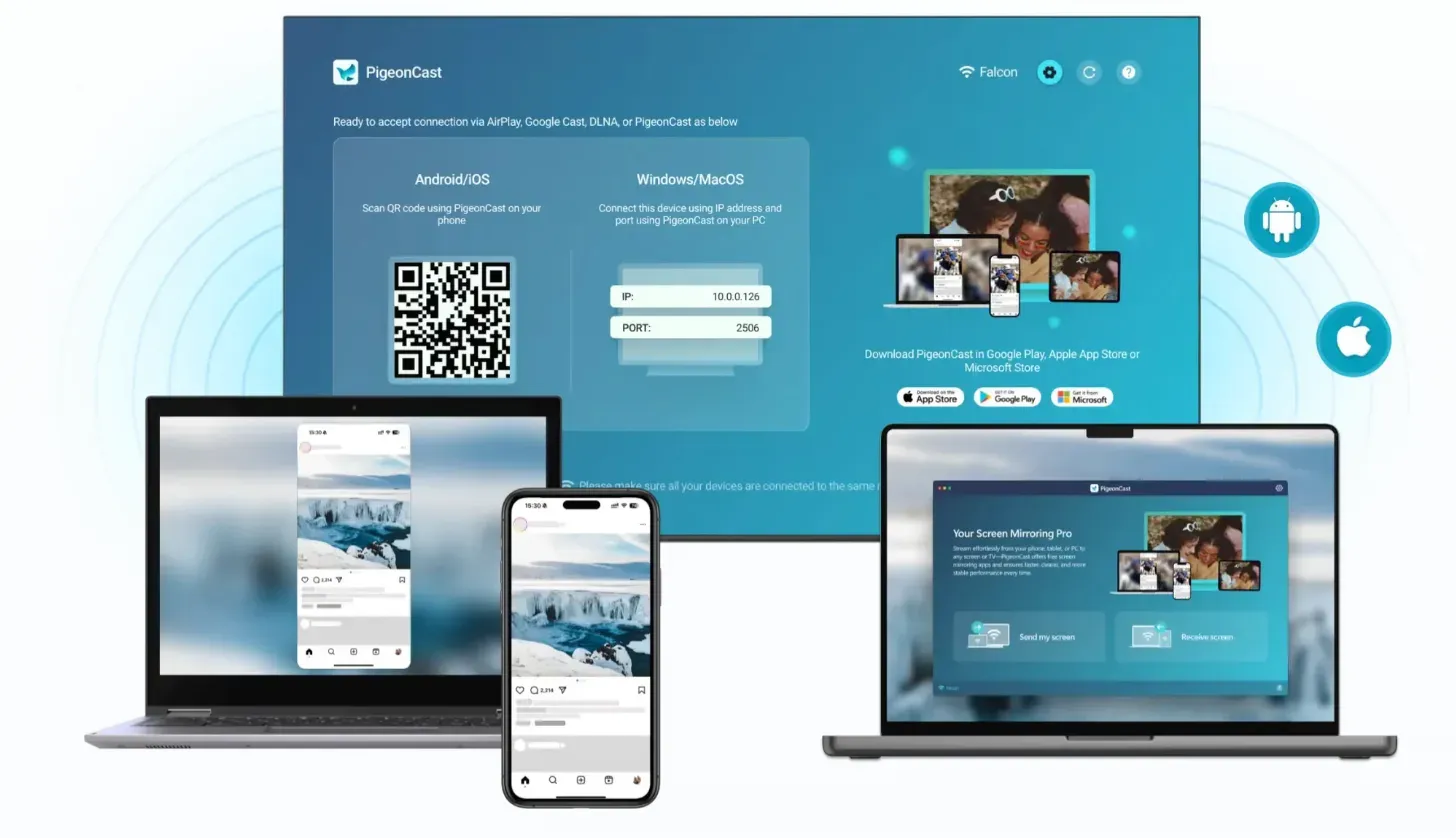
Instead of relying on AirPlay, Cast, or Miracast individually, it introduces a single connection path that works across device types and receiver capabilities.
In practice, this changes the experience from "Which protocol should I try next?" to "Use one known working path when native options become unreliable."
What PigeonCast Solves:
-
Eliminates the need to switch between AirPlay, Cast, and Miracast depending on device
-
Reduces failures caused by protocol-specific discovery or session limitations
-
Provides a more predictable connection flow in mixed ecosystems
-
Helps maintain a stable backup path for live scenarios (presentations, demos, shared spaces)
Typical Setup Workflow:
Step 1. Download and install PigeonCast on the sender (phone or laptop) and the receiver (laptop, TV, or streaming device).


Overall Rating:



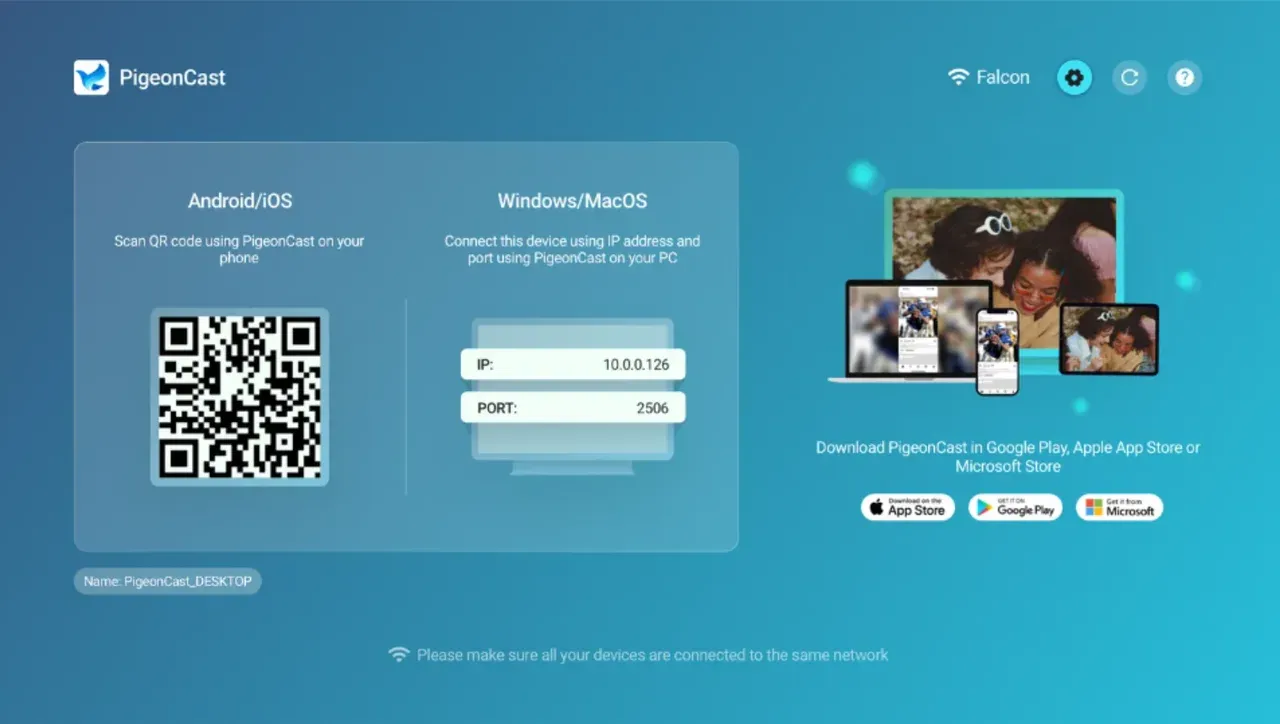
Step 2. Ensure the sender and receiver are on the same WiFi network.
Step 3. Launch the app on both sides and connect the two devices with the onscreen instructions.
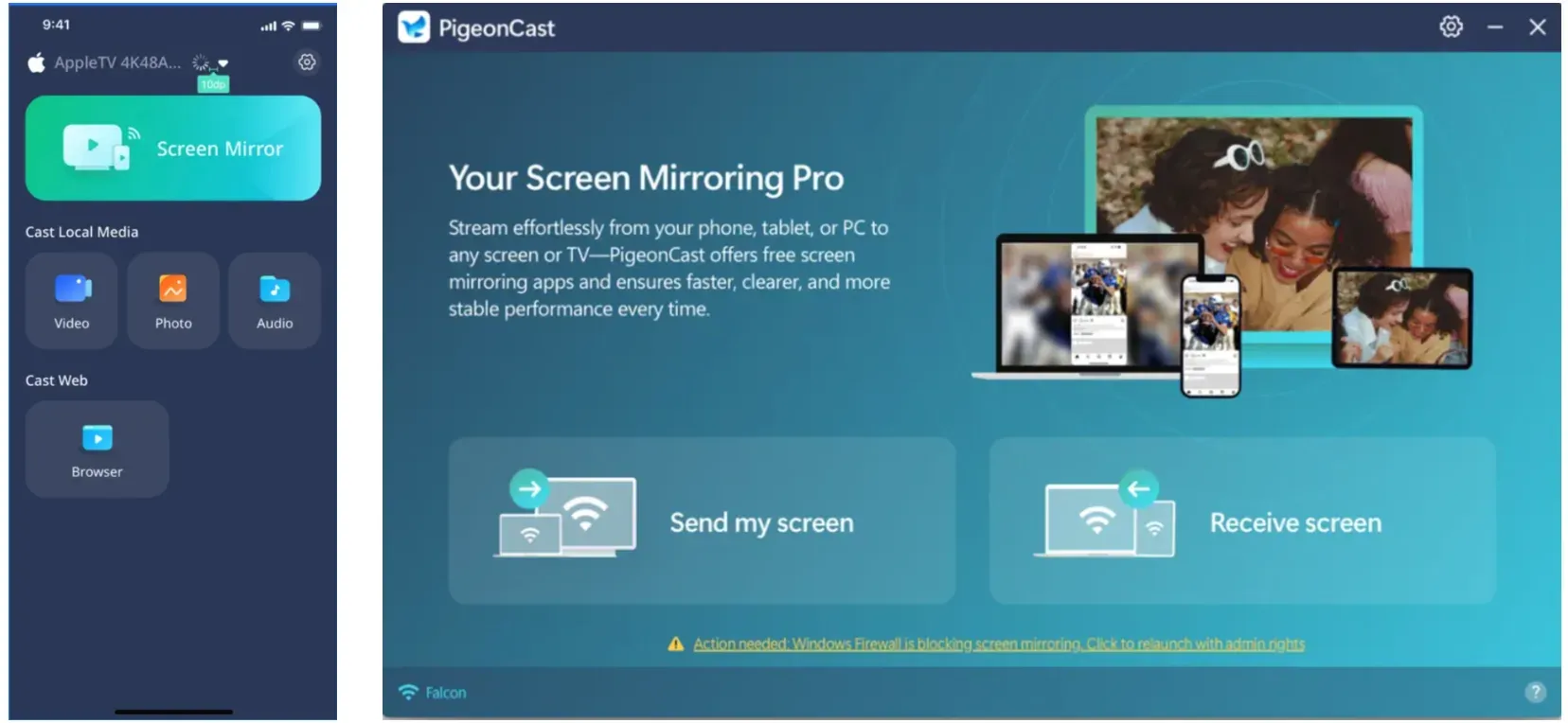
Step 4. Start screen mirroring or content casting.
Conclusion
In the AirPlay vs. DLNA vs. Cast vs. Miracast decision, the best choice is a matching strategy, not a universal winner. AirPlay is strongest in Apple-centric paths, Cast is strongest in app-driven Google workflows, DLNA is strongest for local media libraries, and Miracast is strongest for direct full-screen projection.
If you treat protocol choice as an architecture decision instead of a troubleshooting loop, setup success rates improve fast. Start native, switch classes early when failure signals appear, and keep a third-party backup like PigeonCast for mixed-device environments where native interoperability is inconsistent.
AirPlay vs DLNA vs Cast vs Miracast FAQ
Is Cast the same as screen mirroring?
No. Cast is usually receiver-driven app playback after control handoff, while mirroring duplicates your full sender display in real time.
Why does DLNA work for local files but fail for streaming apps?
DLNA is designed around local media interoperability, not modern DRM-heavy app casting flows. That is why local libraries can work while OTT apps fail.
Is Miracast better than AirPlay for presentations?
For Windows-heavy full-screen projection, Miracast can be very practical. For Apple-centric setups and mixed media workflows, AirPlay may feel smoother.
Why can my TV appear in one protocol list but not another?
Each protocol has different discovery mechanisms and capability checks. A device can expose one stack clearly while limiting another stack.
When should I switch from native protocols to a third-party solution?
After one clean attempt cycle fails and a second protocol class also shows instability, move to fallback. Do not keep repeating the same failed pairing flow.
Do I need internet for all four protocols?
Not always. Miracast can work via direct peer connection, and DLNA local library playback can work on LAN without internet. AirPlay and Cast typically rely on robust local network behavior and may also depend on app cloud paths.
Which protocol is best for lowest latency gaming?
None of these wireless paths are perfect for competitive low-latency gaming. If you must stay wireless, test Miracast and Cast carefully, but wired output is still the safer choice for strict latency targets.
Mia Clarke is a technology editor specializing in screen mirroring and casting solutions across multiple platforms. Mia provides clear, practical guides and in-depth insights to help users seamlessly connect their devices. Passionate about enhancing digital experiences, Mia is dedicated to keeping readers updated on the latest trends and tools in cross-platform screen sharing. Whether you’re looking to mirror your smartphone, laptop, or smart TV, Mia’s content delivers reliable, user-friendly advice to simplify your tech setup.